TL;DR
After the self-hosted Umami setup was running cleanly, I noticed that mainland China was nearly absent from the visitor map — despite bulkpictools.com having Chinese users. The initial instinct was wrong: it looked like an IP parsing bug, but it was actually simpler and more fundamental. The *.vercel.app domain is blocked in mainland China. Chinese users' browsers were sending the /api/send tracking request, hitting a timeout, and silently dropping it. The fix was binding a custom domain to the Vercel project and updating data-host-url in the frontend.
Background
China had one or two data points a day. That's the number that made me stop and look — for a site like bulkpictools.com, mainland China should be a meaningful slice of traffic, not a rounding error.
A few weeks into running the self-hosted Umami setup from Parts 1–3, the dashboard otherwise looked healthy: accurate visitor counts, correct geographic breakdowns everywhere else, no event ceiling. Japan, South Korea, and Singapore all showed up normally. China didn't.
The first assumption was that something was wrong with the GeoIP database or the IP parsing logic from Part 2. That turned out to be the wrong direction entirely.
Investigation
The Wrong Diagnosis: IP Parsing
The natural place to look first was the geolocation stack. Umami reads x-vercel-ip-country to get the visitor's country without having to resolve the IP through MaxMind. I added a temporary log to getClientInfo to see what headers were actually arriving:
console.log('[geo-debug]', {
  'x-vercel-ip-country': request.headers.get('x-vercel-ip-country'),
  'x-vercel-ip-city': request.headers.get('x-vercel-ip-city'),
  'cf-ipcountry': request.headers.get('cf-ipcountry'),
  'x-forwarded-for': request.headers.get('x-forwarded-for'),
});
The output from a test request:
{
  "x-vercel-ip-country": "SG",
  "x-vercel-ip-city": "Singapore",
  "cf-ipcountry": null,
  "x-forwarded-for": "3.0.91.193"
}
3.0.91.193 is an AWS Singapore IP. This looked suspicious — why was a visitor's request showing an AWS node as the origin? The working theory at this point was that Vercel's Serverless Function region (deployed in Singapore) was somehow causing x-vercel-ip-country to return the Function's region rather than the actual visitor's location.
That theory was plausible but wrong. The key signal I was ignoring: every other country was reporting correctly.
Every Other Country Was Fine — Only China Wasn't
If this were a geolocation parsing bug, it would affect all visitors, not just Chinese ones. Japan showed correctly. South Korea showed correctly. Singapore showed correctly. The problem was specific to mainland China — which means the requests weren't being misclassified. They weren't arriving at all.
The real explanation is straightforward: *.vercel.app is blocked in mainland China. It's been this way for years, and it affects every project hosted on Vercel's default domain. When a Chinese user's browser fires the /api/send request to umami-serve.vercel.app, the DNS resolution either fails or the TCP connection times out. The browser makes one attempt, gets no response, and moves on. No data reaches Umami.
The Singapore AWS IP in the logs wasn't from a Chinese user at all — it was from some other request (monitoring service, bot, or a user routing through a VPN) that happened to be logged around the same time I was looking.
This is a common confusion point: when you see strange IPs in x-forwarded-for, the instinct is to debug the IP parsing. But in this case, the strange IP was a red herring. The actual Chinese traffic was invisible because it never made it through.
Why *.vercel.app Is Blocked but a Custom Domain Isn't
The fix only makes sense once you understand why *.vercel.app is blocked in the first place, so here's the mechanism.
Vercel's default *.vercel.app domain resolves to Vercel's shared infrastructure. This shared IP space has been blocked by China's Great Firewall — not because of anything specific to your project, but because the IP ranges are associated with a large volume of content that's collectively blocked. It's the same reason *.github.io has historically had connectivity issues from China: shared infrastructure gets painted with a broad brush.
A custom domain like umami.bulkpictools.com is different. It points to the same Vercel infrastructure, but it resolves through DNS that isn't pre-blocked. The GFW primarily operates on IP ranges and domain names that have been explicitly added to blocklists. A fresh domain that hasn't been flagged will pass through — at least until it does.
The critical detail in this setup: umami.bulkpictools.com is configured in Cloudflare with DNS-only mode (gray cloud), not proxied. This means Cloudflare is acting purely as a DNS resolver — the CNAME points directly to Vercel's servers, and user requests go straight from their browser to Vercel with no intermediate proxy. There's no Cloudflare CDN hop, no Worker, no page rule involved.
Cloudflare isn't doing anything special here — DNS-only mode just resolves the name. The fix works because that name itself isn't blocked.

Solution
Step 1 — Bind the custom domain in Vercel
In the Vercel dashboard, go to your project → Settings → Domains → Add Domain. Enter the subdomain you want to use — in this case umami.bulkpictools.com.
Vercel will give you a CNAME record to add:
umami.bulkpictools.com CNAME cname.vercel-dns.com
Step 2 — Add the DNS record in Cloudflare
In Cloudflare DNS settings for bulkpictools.com, add the CNAME record Vercel provided. Leave the proxy status as DNS only (gray cloud). Proxied mode would route traffic through Cloudflare's CDN, which introduces a different IP layer — for this use case, DNS-only is simpler and sufficient.
Type    Name    Content                  Proxy status
CNAME   umami   cname.vercel-dns.com     DNS only
Vercel will automatically provision an SSL certificate for the domain via Let's Encrypt. This usually completes within a minute or two of DNS propagating.
Step 3 — Update data-host-url in the frontend
Change the Umami script configuration to point to the new domain:
customScripts.push({
  src: `https://cdn.bulkpictools.com/script/script.js`,
  defer: true,
  'data-website-id': umamiAnalyticsId,
  'data-host-url': 'https://umami.bulkpictools.com'  // was: umami-serve.vercel.app
})
Deploy the frontend change. From this point, all /api/send requests from visitors go to umami.bulkpictools.com instead of umami-serve.vercel.app.
Step 4 — Verify
The quickest verification is checking Vercel Function Logs immediately after deploying the change. Within a few minutes you should see /api/send requests arriving with Chinese IP addresses and x-vercel-ip-country: CN.
My Take
The frustrating part of this diagnosis was spending time on IP parsing — looking at x-forwarded-for values, checking prisma.config.ts, adding debug logs — when the actual problem had nothing to do with any of that. The Chinese requests weren't being misattributed. They didn't exist.
The lesson I've internalized: when data from a specific geography is missing entirely rather than incorrect, the first question should be "are requests from this region reaching the server at all?" — not "is the server parsing the data correctly?" Missing data and wrong data have different root causes. I jumped to the wrong branch of the debugging tree.
On the *.vercel.app blocking: this isn't a Vercel-specific problem. Any hosting platform that serves its customers under a shared wildcard domain faces the same exposure in markets with aggressive content filtering. *.github.io, *.netlify.app, and similar domains have all had episodes of partial or full blocking. If you're building something where mainland China traffic matters, a custom domain isn't optional — it's baseline infrastructure, the same as having HTTPS.
One honest caveat about this fix: a custom domain reduces the risk of being blocked, but doesn't eliminate it. If bulkpictools.com itself were ever added to a blocklist, umami.bulkpictools.com would go with it. The domain-based fix works because the domain is currently unlisted — it's not a structural bypass of the GFW. For most independent developers running normal web products, this is fine. For anything in a higher-risk content category, the calculus is different.
The DNS-only configuration also means there's no Cloudflare CDN caching in front of the Umami API — which is appropriate, since /api/send should never be cached. If you were serving static assets this way, you'd want the orange cloud. For an analytics endpoint, gray is correct.
Result
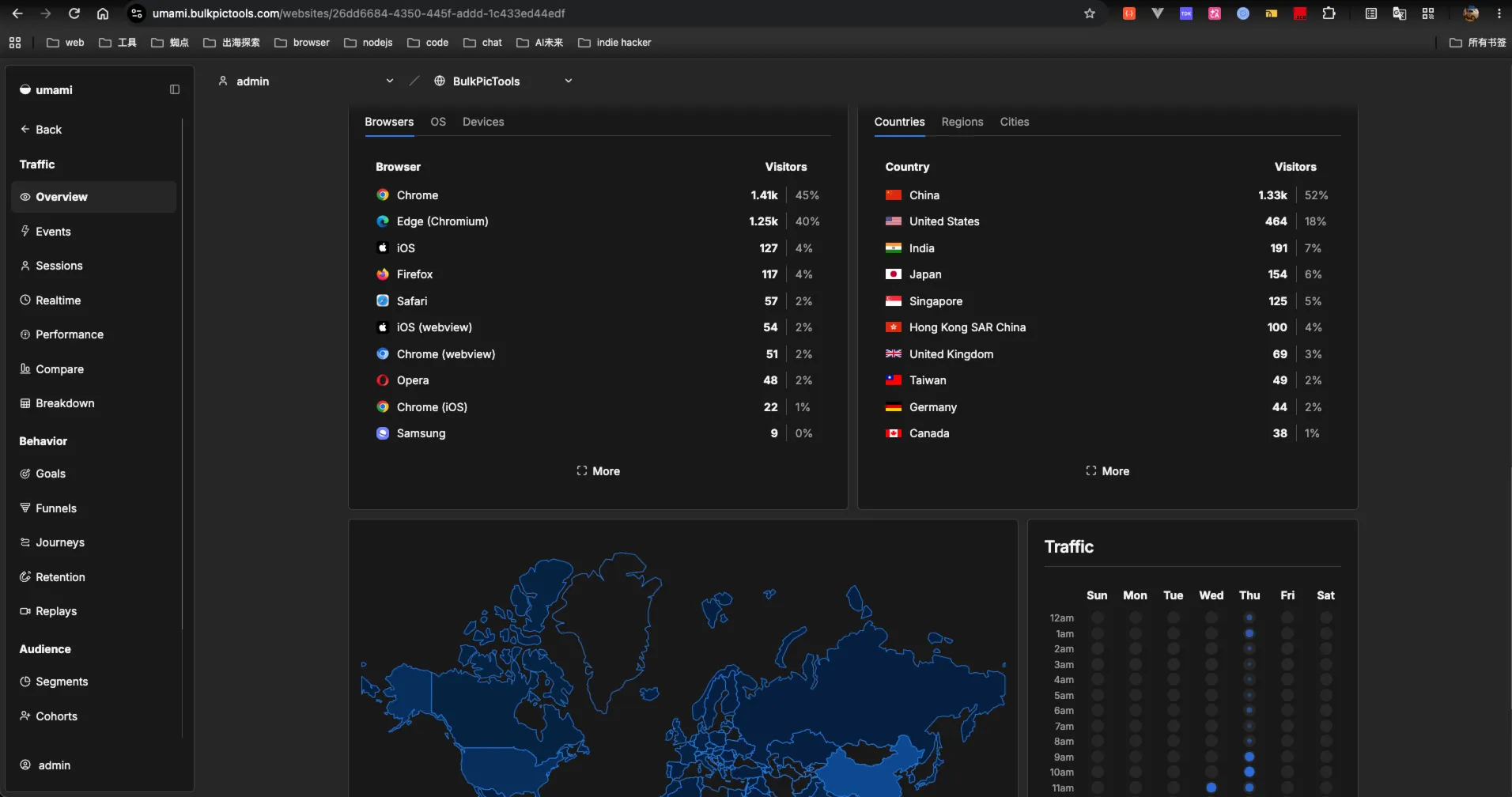
After deploying the custom domain change, mainland China data started appearing in the Umami dashboard within minutes.
Lessons Learned
Missing data and wrong data have different root causes. When an entire geography shows zero rather than incorrect values, debug connectivity before parsing. The question is "are requests arriving?" not "are requests being misread?"
*.vercel.app is blocked in mainland China. So is *.netlify.app, and periodically *.github.io. If China traffic matters to your project, a bound custom domain belongs in the initial setup checklist, not the backlog.
DNS-only is the right Cloudflare setting for an analytics endpoint. Proxied mode adds Cloudflare's CDN layer, which is useful for cacheable assets but wrong for a write endpoint like /api/send. Gray cloud keeps the path simple: DNS resolution, then a direct connection to Vercel.
Custom domain fixes the access problem, not the blocking risk. The domain works today because it isn't listed. That's a different thing from being guaranteed to work. That distinction rarely matters for indie projects — but knowing the mechanism means you won't be blindsided if the situation changes.
Debug logs should target the right layer. Adding x-forwarded-for and x-vercel-ip-country logs was useful for ruling out the IP parsing hypothesis, but it couldn't reveal the actual problem because the actual problem was happening before any request reached the server. When logs show nothing unusual, sometimes the issue is that the right requests aren't in the logs at all.
Part of the "Self-Hosting Umami on Vercel + Supabase" series. ← Part 1 · ← Part 2 · ← Part 3