TL;DR
My Umami Cloud free plan hit the 100k events/month ceiling and data collection silently stopped. I tried Cloudflare Web Analytics as a zero-cost drop-in — it showed 4x the traffic Umami did, which turned out to be mostly bots. That wasn't good enough. So I decided to self-host Umami on Vercel + Supabase. This post is about the decision; the actual deployment nightmare gets its own two posts.
Background
bulkpictools.com is a side project I've been running for a while — bulk image processing that runs entirely in the browser, no uploads, no server. Traffic had been growing steadily. I was on Umami Cloud's Hobby free tier because it checked all the boxes: clean UI, privacy-respecting, no cookie banners, and a dashboard that shows exactly the signal I care about — real human visitors, where they came from, which tools they used.
One day in late May I opened the dashboard and it was showing zero visitors for the past few days. Not a dip. Zero.
The Problem
My first instinct was that the tracking script had gotten blocked, or something on the site had broken. I opened DevTools and checked the network tab — the /api/send request was going out fine, returning 200. The script was loading. I spent close to fifteen minutes chasing that theory: checking whether an ad blocker was involved, whether a browser extension was interfering, reloading in incognito. Nothing.
Then I checked the Usage page at cloud.umami.is/settings/usage, and the actual cause was staring back at me.
The Hobby free plan caps out at 100,000 events per month. I had blown past it.
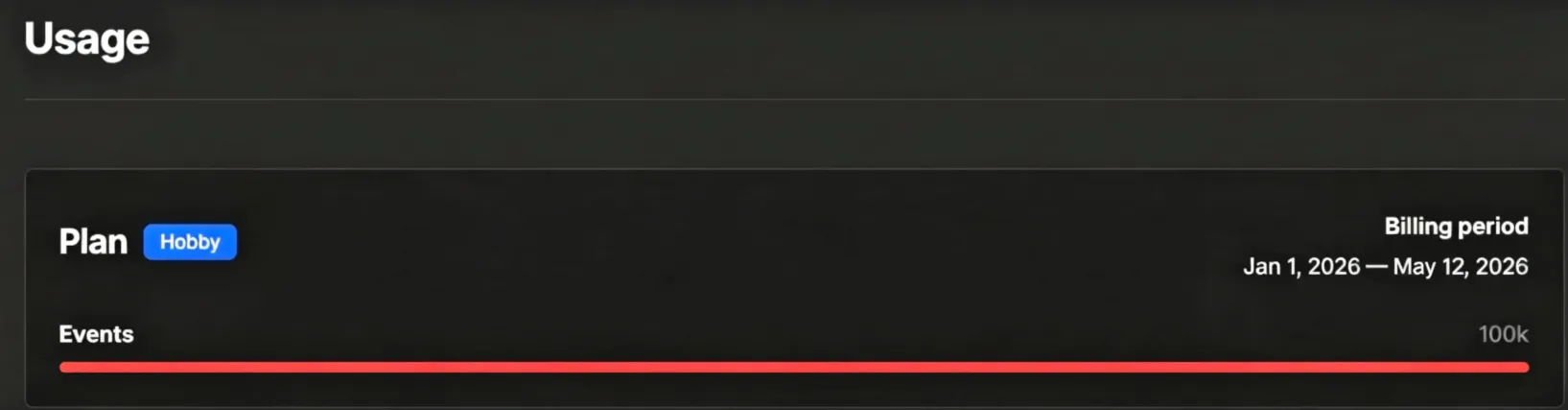
Umami Cloud doesn't warn you when you're approaching the limit. No email, no dashboard alert, no degraded-mode banner. Data collection just stops. If I hadn't happened to check the dashboard during that zero-visitor streak, I could have gone weeks thinking my traffic had collapsed.
100k events a month sounds generous until you realize it isn't just page views. Every custom event — tool usage, button clicks, anything you track — counts toward that ceiling. A site with real engagement burns through it faster than a simple blog does.
What I Tried First: Cloudflare Web Analytics
Since bulkpictools.com is already behind Cloudflare, enabling Web Analytics was a one-click affair. No new scripts, no DNS changes — Cloudflare injects the tracker automatically at the edge. I had it running within two minutes.
The numbers didn't match at all.
Umami had been showing around 1,000 real visitors per day. Cloudflare was showing 4,000+.
That 4x gap isn't measurement noise. It comes down to what each tool actually counts:
Umami counts humans. It relies on a JavaScript snippet that runs in the browser. If a visitor's ad blocker kills the script, that visit is invisible to Umami. If a bot doesn't execute JavaScript (most don't), it doesn't register. If someone closes the tab before the script loads, nothing is recorded. Umami systematically undercounts, but what it does count is almost entirely real human traffic.
Cloudflare counts everything that touches your server. It operates at the network layer, before JavaScript ever runs. Every request — crawlers, scrapers, health checks, RSS readers, monitoring services, and yes, real visitors — gets tallied. No filtering unless you configure it explicitly.
The 3,000-visit gap was real, and most of it was machines — crawl rate is useful information on its own, just not the signal I actually needed. When I'm trying to understand whether a new tool page is getting real traction, I need the Umami number, not the Cloudflare one.
There was another issue: Cloudflare Web Analytics only retains data for 30 days. Umami had been giving me month-over-month trend lines I could use to evaluate whether a content push was working. Losing that history wasn't acceptable.
So Cloudflare as a full replacement was off the table.
The Decision: Self-Host vs Pay
Here's what I was actually choosing between:
Upgrade Umami Cloud to Pro ($20/month, 1M events/month, 2-year retention). Cleanest path. Zero configuration, data migrates automatically. But $20/month is $240/year for analytics on a side project that hasn't hit meaningful revenue yet. Hard to justify on principle alone.
Switch to a different cloud tool (Plausible, Fathom, etc.). Similar pricing tier, similar constraints. I'd just be picking a different ceiling.
Self-host Umami on a VPS. Full control, no limits, but adds operational overhead — a server to maintain, backups to set up, uptime to care about.
Self-host on Vercel + Supabase. Both have free tiers. Vercel handles deployments automatically. Supabase provides the PostgreSQL database. If the free tier holds, the ongoing cost is zero. The risk is operational complexity during setup, and potentially hitting another free tier limit down the road.
I went with Vercel + Supabase. It wasn't the easiest path — Parts 2 and 3 of this series cover exactly how much it wasn't — but I wanted to understand the full deployment stack, not just click a few buttons and hope it keeps working. If I'm going to depend on this infrastructure, I should know exactly how it runs. And if Supabase's free tier ever becomes a bottleneck, I'll have the knowledge to migrate the database layer without touching the Vercel deployment.
My Take
The free tier ceiling was predictable, and I just hadn't done the math. 1,000 active daily users, multiple trackable events per session — bulkpictools.com tracks tool usage on top of page views — and 100k events a month runs out fast. I signed up for the Hobby plan without ever multiplying those numbers together.
Free tiers on analytics tools are sized for projects that haven't taken off yet. Once a project gets real traffic, you're a paying customer whether you've accepted that or not. Umami's pricing is fair by SaaS standards — $20/month for 1M events isn't unreasonable — I just hadn't priced in my own growth.
Cloudflare Web Analytics is genuinely good at what it does, and if you're already on Cloudflare, turning it on costs nothing. If you need a quick pulse on traffic, it's the right tool. The 30-day retention is the real constraint. If your workflow is purely "how many people visited this week," Cloudflare is all you need and it will never cost you anything.
For me, the missing piece was longitudinal data — watching a specific URL climb or fall in traffic over two to three months. That's where Umami's data model, which stores every event with full timestamp and metadata, wins.
What's Next
The actual Vercel + Supabase deployment turned out to be more complicated than the tutorials suggest. There are connection string traps, a Prisma migration that silently hangs due to the wrong port, and a 66MB GeoIP database that can silently kill your Vercel build if you don't handle it correctly.
Part 2 covers the connection string issues and why prisma migrate deploy kept hanging — specifically the DATABASE_URL vs DIRECT_DATABASE_URL distinction that the official docs mention but don't fully explain.
Part of the "Self-Hosting Umami on Vercel + Supabase" series. · Part 2: The Connection String Traps · Part 3: GeoIP, Migration Bypass, and Git LFS