TL;DR
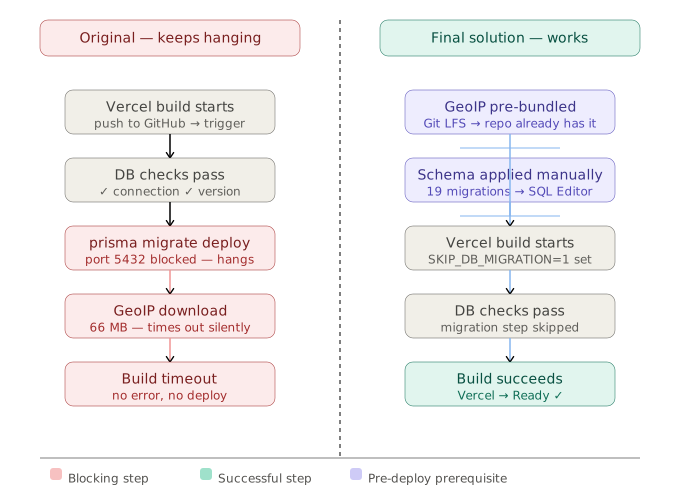
After fixing the database connection strings in Part 2, the Vercel build still hung — this time silently, with no error output at all. The cause was two separate issues: a 66MB GeoIP database file that the build tried to download at compile time and couldn't, and the prisma migrate deploy step that couldn't reach Supabase's direct connection port from the build environment. The solution was to pre-bundle the GeoIP file in the repository using Git LFS, skip the build-time migration entirely with SKIP_DB_MIGRATION=1, and run the database schema manually through Supabase's SQL Editor.
Background
At the end of Part 2, the local development server was running cleanly. Both connection strings were correct, prisma.config.ts was updated, and Umami loaded at localhost:3000. The logical next step was to push to GitHub and let Vercel handle the deployment.
The Vercel build log reached the same three green checkmarks as before:
✓ DATABASE_URL is defined.
✓ Database connection successful.
✓ Database version check successful.
And then stopped. Same symptom as the connection string problem from Part 2, but the database connection was now confirmed working. Something else was hanging the build.
Problem 1: The 66MB GeoIP File
Umami uses MaxMind's GeoLite2-City database to resolve visitor IP addresses to geographic locations. It's a 66MB binary file in MaxMind's .mmdb format. In Umami's build process, if this file isn't already present in the geo/ directory, the build script attempts to download it at compile time.
On a local machine with a fast connection, this download completes in a few seconds and you never notice it. On Vercel's build environment, the download either times out silently or gets blocked by network policy — the build just hangs waiting for a file that never arrives, with no timeout error surfaced to the log.
The build log shows nothing after the database checks because the hang happens inside a network request with no surrounding log output. You only find this by going looking for it specifically — nothing points you here on its own.
How to confirm this is the issue:
Look for the GeoIP download logic in the source. In the version I forked, the relevant code lives in the build scripts. A quick search confirms it:
grep -r "GeoLite2\|mmdb\|geo/" --include="*.ts" --include="*.js" -l
If you see files referencing GeoLite2-City.mmdb and a download URL, this is your blocker.
Pre-bundling GeoLite2-City.mmdb via Git LFS Eliminated the Download
The fix is to download the file once locally and commit it to the repository. Vercel clones your repo at build time, so the file is already present — no download needed.
The catch: at 66MB, the file exceeds GitHub's 50MB soft limit for regular git objects. Pushing it without Git LFS will fail or produce a warning, and on subsequent clones the file won't transfer correctly.
Step 1 — Install Git LFS
brew install git-lfs
git lfs install
Verify it's in your PATH before proceeding:
git lfs version
# git-lfs/3.x.x (GitHub; darwin arm64; go 1.x.x)
If git lfs version returns "command not found" after installation, your shell's PATH doesn't include Homebrew's bin directory. Fix it:
export PATH="/opt/homebrew/bin:$PATH"
Add this line to your ~/.zshrc or ~/.bash_profile to make it permanent.
Step 2 — Track .mmdb files
git lfs track "*.mmdb"
git add .gitattributes
This creates or updates .gitattributes to tell Git LFS to handle all .mmdb files. Commit .gitattributes first — if you add the binary before telling LFS to track it, the file gets committed as a regular git object and you'll have to undo it.
Step 3 — Download the GeoIP file
MaxMind requires a free account to download GeoLite2 databases. Once you have a license key:
mkdir -p geo
curl -L "https://download.maxmind.com/app/geoip_download?edition_id=GeoLite2-City&license_key=YOUR_KEY&suffix=tar.gz" \
  | tar -xz --strip-components=1 -C geo "*/GeoLite2-City.mmdb"
Or if you downloaded it manually, just place the .mmdb file in the geo/ directory at the project root.
Step 4 — Commit and push
git add geo/GeoLite2-City.mmdb
git commit -m "add GeoLite2-City database for IP geolocation"
git push
Watch the push output. With Git LFS correctly configured, you'll see something like:
Uploading LFS objects: 100% (1/1), 66 MB | 2.3 MB/s, done.
If you see the regular git progress bar instead of the LFS upload line, LFS isn't tracking the file — go back and verify .gitattributes was committed before the binary.
Problem 2: prisma migrate deploy Blocked from Vercel's Build Environment
Even with the GeoIP file pre-bundled, the check-db.js build script still tried to run prisma migrate deploy — which required a direct database connection on port 5432. From Vercel's build environment, this connection was blocked: either by network policy, or because Supabase's direct connection endpoint wasn't reachable from Vercel's build infrastructure at the time.
This is a different network context from Vercel's runtime. The serverless functions that run your app have different network access than the build container that compiles it. The direct connection worked fine locally (with a proxy), but the build environment is not the same environment as your laptop.
The result: prisma migrate deploy hung inside check-db.js, and the build timed out.
SKIP_DB_MIGRATION=1 Got the Build Past the Hang
Add this environment variable to Vercel:
SKIP_DB_MIGRATION=1
In check-db.js, the applyMigration() function checks for this variable before running prisma migrate deploy:
async function applyMigration() {
  if (!process.env.SKIP_DB_MIGRATION) {
    console.log(execSync('prisma migrate deploy').toString());
    success('Database is up to date.');
  }
}
With SKIP_DB_MIGRATION=1 set, this function exits immediately. The build completes. Vercel deploys successfully.
The trade-off: schema migrations and deployments are now separate steps. That's a deliberate pattern, not a compromise — but it does mean running migrations manually every time the schema changes.
Running the Concatenated Migration SQL Manually in Supabase Created the Missing Tables
With the build-time migration bypassed, the database tables don't exist yet. Umami will fail on login because the user table (and everything else) hasn't been created.
The approach: concatenate all of Umami's migration SQL files into one script and execute it directly in Supabase's SQL Editor.
Step 1 — Concatenate all migration files
From the project root:
cat prisma/migrations/01_init/migration.sql \
    prisma/migrations/02_report_schema_session_data/migration.sql \
    prisma/migrations/03_metric_performance_index/migration.sql \
    prisma/migrations/04_team_redesign/migration.sql \
    prisma/migrations/05_add_visit_id/migration.sql \
    prisma/migrations/06_session_data/migration.sql \
    prisma/migrations/07_add_tag/migration.sql \
    prisma/migrations/08_add_utm_clid/migration.sql \
    prisma/migrations/09_update_hostname_region/migration.sql \
    prisma/migrations/10_add_distinct_id/migration.sql \
    prisma/migrations/11_add_segment/migration.sql \
    prisma/migrations/12_update_report_parameter/migration.sql \
    prisma/migrations/13_add_revenue/migration.sql \
    prisma/migrations/14_add_link_and_pixel/migration.sql \
    prisma/migrations/15_add_share/migration.sql \
    prisma/migrations/16_boards/migration.sql \
    prisma/migrations/17_remove_duplicate_key/migration.sql \
    prisma/migrations/18_add_performance/migration.sql \
    prisma/migrations/19_add_session_replay/migration.sql \
    > /tmp/umami_all.sql

echo "Done. File at /tmp/umami_all.sql"
The order matters — these migrations build on each other. Run them in sequence, which is what this command does by concatenating them in numbered order.
Step 2 — Execute in Supabase SQL Editor
Open /tmp/umami_all.sql in a text editor, select all, copy. Then:
- Go to your Supabase project → SQL Editor → New query
- Paste the SQL
- Click Run
If the SQL runs without errors, you'll see a success message and the table count in Supabase's Table Editor should jump from 0 to around 15 tables.
Step 3 — Verify locally before deploying
Before pushing to Vercel, confirm the tables exist and the app can use them:
pnpm dev
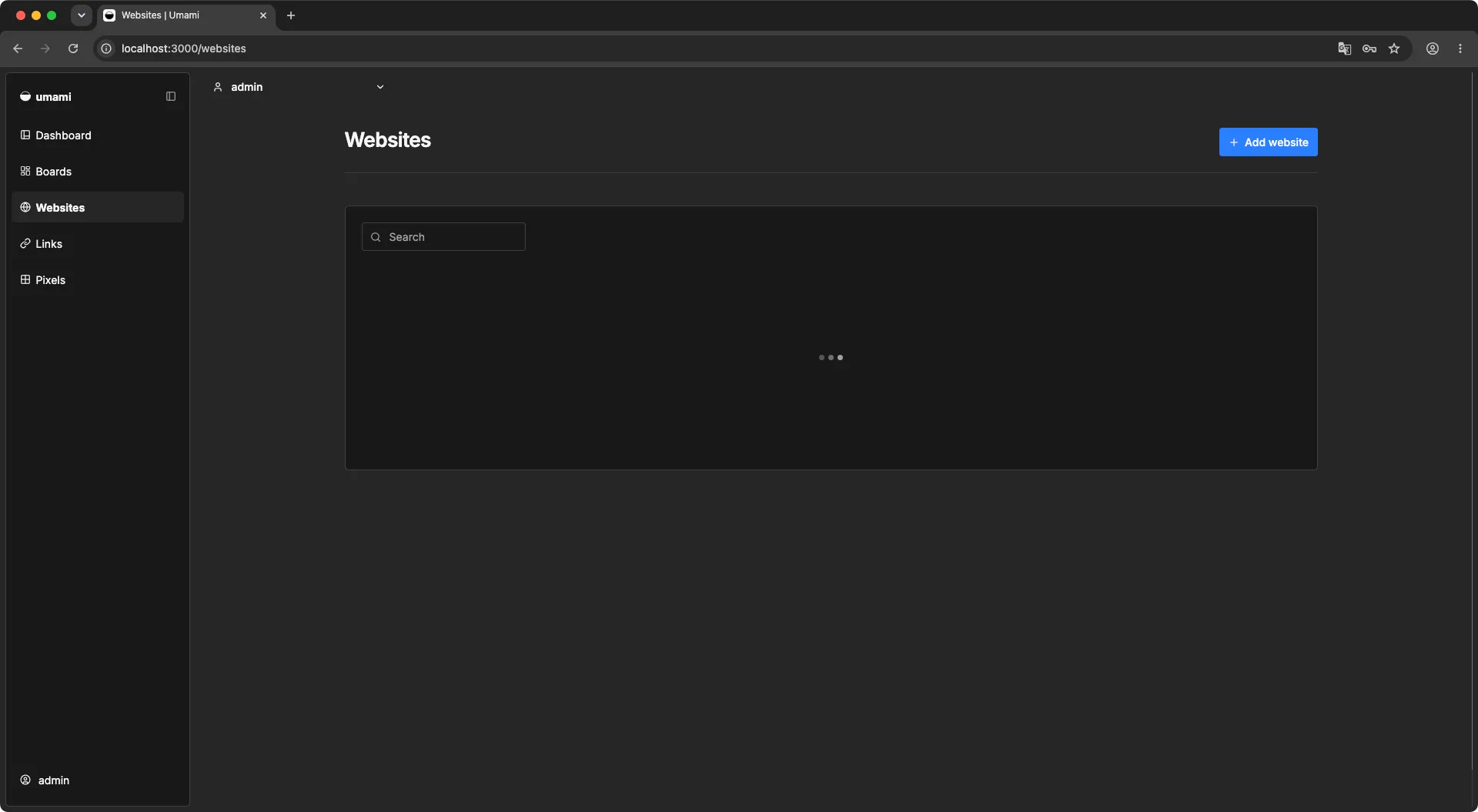
Navigate to localhost:3000, log in with the default credentials (admin / umami), and change the password immediately. If login succeeds, the schema is complete and the app is functional.
The Final Vercel Deployment
With both blockers resolved:
- GeoLite2-City.mmdb committed to the repo via Git LFS
SKIP_DB_MIGRATION=1set in Vercel environment variables- Database schema applied manually via Supabase SQL Editor
Push to GitHub and trigger a Vercel deployment. The build log now runs through cleanly:
✓ DATABASE_URL is defined.
✓ Database connection successful.
✓ Database version check successful.
Skipping database migration.
✓ Build completed successfully.

Replace the tracking script in your website's <head> with the new one from your self-hosted Umami instance. Within a few minutes, data starts flowing in — identical dashboard, no event limits, no monthly ceiling.
My Take
Looking back at the full three-part journey, what stands out is that none of the individual problems were particularly hard. The connection string issue has a documented fix. The GeoIP download is a known constraint. Git LFS is a standard tool. But they're sequential — you can't discover problem 3 until you've solved problems 1 and 2 — and each one presents the same symptom: a silent hang with no actionable error output.
That's the real difficulty. When a build fails with an error, you fix the error. When a build hangs silently, you're debugging a ghost. The mental model I developed by the end: any time a Vercel build hangs after the database checks pass, the next question isn't "what's wrong with my code" — it's "what network request is this build environment failing to complete."
On the SKIP_DB_MIGRATION approach specifically: I treated this as a hack at first. It isn't — decoupling schema migrations from deployments is standard practice on teams where a bad migration could take down a live service. Running migrations manually (or through a separate CI step) means you can verify the SQL before it touches the live database. The Vercel build being blocked just forced me into a pattern I should have been using anyway.
One honest limitation of this setup: Supabase's free tier pauses inactive projects after one week of inactivity. With 1,000+ daily visitors on bulkpictools.com, the database has constant activity and this won't trigger. But if you're setting this up for a low-traffic site, be aware that the first request after a pause will cold-start the database and fail — subsequent requests will be fine. The workaround is a cron job that pings the database every few days, or upgrading to Supabase's Pro plan ($25/month).
The GitHub repository for my self-hosted Umami setup: kbmjj123/umami-serve. The key changes from the upstream repo are the updated prisma.config.ts and the committed GeoIP database.
Lessons Learned
Silent build hangs almost always mean a blocked network request. Vercel's build environment has different network access than its runtime environment, and different again from your local machine. When the build stops responding after a successful step, look for HTTP requests or TCP connections in the subsequent code — one of them isn't completing.
Pre-bundle large static assets instead of downloading them at build time. The 66MB GeoIP database could in principle be downloaded fresh on every build, but that's fragile — dependent on MaxMind's servers, your network, and Vercel's build timeout. Committing it to the repo via Git LFS makes the build deterministic. The same principle applies to any build-time asset that isn't generated from source code.
Git LFS setup order matters. Track the file extension in .gitattributes and commit that file before adding the binary. If you add the binary first, git commits it as a regular object, and you'll need to rewrite history to move it into LFS properly. The correct sequence: git lfs track "*.mmdb" → git add .gitattributes → git commit → git add geo/*.mmdb → git commit.
Separating migrations from deployments is a feature, not a workaround. SKIP_DB_MIGRATION=1 sounds like a hack, but running schema changes as a deliberate manual step (or a separate CI job) is safer than bundling them into the deploy. You get to review the SQL, run it on a test database first, and roll back independently of the application code if something goes wrong.
Check Supabase's free tier pause policy if your site has low traffic. The free tier pauses projects with no activity for 7 days. 1,000 daily visitors won't trigger this, but a side project in early stages might. A simple keep-alive cron job solves it without needing to upgrade.
Series Wrap-Up
Three posts, three problem categories:
- Part 1 — The decision: why Umami Cloud's free tier stopped being free for a growing project, and how the alternatives actually compare
- Part 2 — The connection layer: PgBouncer vs direct connection, the
prisma.config.tsoverride, and the IPv6 fallback trap - Part 3 — The build layer: GeoIP download blocking the build, manual schema migration, and getting a large binary into GitHub without breaking the push
The self-hosted setup has been running cleanly since. No event ceiling, no monthly billing surprises, and the Supabase free tier's 500MB database storage gives plenty of headroom for the current traffic level.
If you're setting this up yourself and hit a step that isn't covered here, the repository at kbmjj123/umami-serve has the final working configuration.
Part of the "Self-Hosting Umami on Vercel + Supabase" series. ← Part 1: Why I Left Umami Cloud · ← Part 2: The Connection String Traps