The short version: three projects, three modes, one decision tree
I run three projects on Nuxt 4 + Cloudflare, each using a different deployment mode. Not because I planned it — each project hit the limits of the previous mode. This article is the decision framework I wish I had before building them.
| Mode | Best for | Watch out for |
|---|---|---|
| SSG | Content that's the same for everyone | Build time scales with page count |
| SSR | Per-request logic (auth, personalization) | Cold starts, Worker costs |
| Hybrid | Mostly static + a few dynamic routes | Config complexity doubles |
Quick decision: If every user sees the same content → SSG. If you need server logic per request → SSR. If 80% is static but you need a few dynamic endpoints → Hybrid.
The Real Cost of Choosing Wrong
Choosing a deployment mode isn't a one-time decision you can patch later. The mode determines:
- Whether your site has a server runtime at all
- How it accesses data (build-time vs request-time)
- What infrastructure you need to maintain
- How much you pay at scale
Pick SSG when you need SSR, and you'll end up hacking client-side workarounds for features that should be server-side. Pick SSR when SSG would do, and you're paying for a Worker to render the same HTML on every request — content that could've been a static file served from a CDN for free.
I didn't plan to run three modes. Each project forced the switch when its needs outgrew the previous mode's boundaries.
Three Modes, One Table
Before diving into when to use each, here's what actually differs at the infrastructure level:
| SSG | SSR | Hybrid | |
|---|---|---|---|
| Render timing | Build time | Per request | Per route |
| Output | Static HTML files | Worker-rendered HTML | Mix of both |
| Server runtime | None | Cloudflare Worker | Worker (for dynamic routes) |
| API routes | ❌ No | ✅ Yes | ✅ Yes |
| Cold start | None | 0-5ms | 0-5ms (dynamic routes only) |
| Database access | Build-time only | Per request | Per request (dynamic routes) |
| CDN cache | Always hit | Miss on first request | Static always, dynamic varies |
| Build time (800 pages) | ~15 min | ~30s | ~15 min + 30s |
| Cost at scale | $0 (static hosting) | Worker requests | Worker requests (partial) |
The key insight: SSG and SSR aren't just different configs — they're different architectures. SSG has no server. SSR always has one. Hybrid lets you choose per route, but you pay for that flexibility in config complexity.
The Decision Tree
Three questions. That's all you need.
Q1: Does every user see the same content for a given URL?
    │
    ├── YES → Q2: Do you need server-side features?
    │              (API routes, auth, DB queries, personalization)
    │              │
    │              ├── NO  → SSG
    │              └── YES → Q3: Are most pages static,
    │                            with only a few dynamic routes?
    │                            │
    │                            ├── YES → Hybrid
    │                            └── NO  → SSR
    │
    └── NO (per-user content) → SSR
SSG wins when content is deterministic. Every user gets the same HTML. No server needed.
SSR wins when you need per-request logic. Auth checks, ad routing, real-time data — anything that changes per user or per request.
Hybrid wins when you have a content-heavy site (blog, docs, portfolio) with a few dynamic features (comments, search, subscriptions). Most pages are static; the dynamic ones go through the Worker.
When SSG Is a Trap
SSG sounds perfect: build once, serve forever from the CDN, zero cost. But it breaks down in specific scenarios.
1. Too many pages
My BulkPicTools site has 800+ pages. A full nuxt generate takes 15 minutes on Cloudflare Pages. Every content change triggers a full rebuild. At 1,000 pages, you're looking at 20+ minutes. At 10,000 pages, you need incremental builds or you're waiting half an hour for a typo fix.
The fix: If your page count is growing fast, Hybrid lets you keep the content pages static while routing the high-churn pages through SSR.
2. Personalized content
Need to show different ads to different users? A/B test headlines? Serve geo-specific content? SSG can't do any of this server-side. You'd have to render a shell HTML and personalize client-side with JavaScript — which hurts SEO, increases time-to-interactive, and creates a flash of generic content.
The fix: SSR or Hybrid. Let the server decide what to render before the HTML reaches the browser.
3. Data that changes frequently
Comments, view counts, like buttons, real-time stock prices — anything that changes between builds can't be baked into static HTML. You'll end up fetching everything client-side, which defeats the purpose of SSG.
The fix: Hybrid. Static content stays static. Dynamic data gets its own API routes through the Worker.
4. No API routes
SSG has no server runtime. That means no server/api/ routes. If your frontend needs to call your own backend (for form submissions, webhooks, newsletter triggers), you need a separate service — which adds complexity and cost.
The fix: Hybrid gives you API routes on the Worker while keeping content pages static.
When SSR Is Overkill
SSR gives you maximum flexibility. But flexibility has a cost.
1. Pure content sites
If every page is a blog post, a docs page, or a portfolio piece — content that's identical for every visitor — there's no reason to render it on every request. You're paying for a Worker to generate the same HTML over and over.
The rule: If you can nuxt generate it, you probably should.
2. Low traffic
Workers have a free tier of 100,000 requests per day. Sounds like a lot, but a site with 50 pages and 10 crawlers hitting it regularly can burn through that. And if you're running a small personal blog with 200 visitors/day, you don't need per-request rendering — a CDN cache miss on every request is wasted compute.
3. Debugging complexity
SSR means server-side errors. Hydration mismatches. Node.js APIs that don't work in the Workers runtime. Environment variables that behave differently on the edge. Every one of these is a debugging session you wouldn't have with SSG.
The rule: Don't add SSR for features you might need someday. Add it when you actually need it.
Hybrid: Best Balance or Most Complex?
Hybrid mode is what I use for this blog. It's also the hardest to get right.
The promise
Route-level control. Static pages (blog posts, about, projects) are pre-rendered by @nuxt/content at build time and served from the CDN. Dynamic routes (search, tags, comments, subscription) go through the Cloudflare Worker, which queries D1 and renders HTML per request.
The best of both worlds.
The reality
- Config complexity doubles. You need to understand Nitro's route rules,
@nuxt/content's build pipeline, and how Cloudflare Pages handles the mixed output. - Debugging gets harder. Is this route static or dynamic? Did the Worker render it or did the CDN serve a cached file? Why is this page slow — build-time or runtime?
- Deployment takes longer. You're running both a static build AND a Worker deploy. Build time = SSG build time + Worker deploy time.
When it's worth it
Your site is content-first (blog, docs, portfolio) with dynamic features bolted on (comments, search, auth, subscriptions). The 80/20 rule: 80% of your pages are static, 20% need server logic.
When it's not
If you're 100% static → use SSG. If you're 100% dynamic → use SSR. Don't add Hybrid for "flexibility" — it's not a middle ground, it's a complexity multiplier.
Real-World Case Studies
Three projects. Three modes. Each chosen for a reason.
Case 1: BulkPicTools → SSG
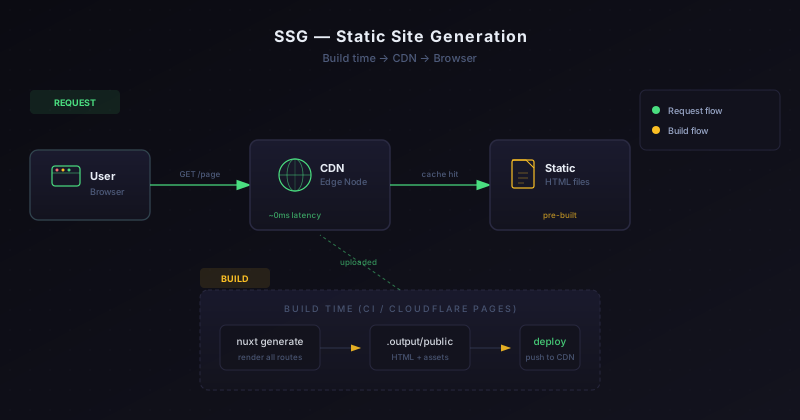
What it is: A batch image processing tool chain with 50+ tools and 800+ pages.
Why SSG:
- Every page is identical for every user
- No auth, no personalization, no server-side logic
- Tools are client-side JavaScript — the HTML is just a container
- 800+ pages, but content rarely changes
What I learned:
- Build time (15 minutes) is the main pain point. A typo fix means a full rebuild.
- No API routes means I can't add a contact form without a separate backend.
- If I were building this today, I'd consider Hybrid — keep the tool pages static, but add API routes for analytics and form handling.
Case 2: AIFindr → SSR
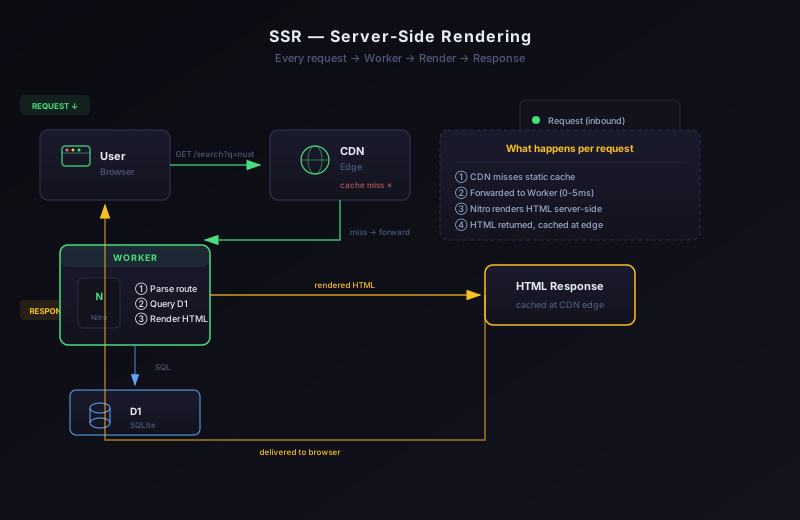
What it is: An AI tools directory that serves different ads based on user geography.
Why SSR:
- Ad platform routing: wwads for Chinese users, AdSense for everyone else
- Server-side metadata injection for SEO (structured data that varies per page)
- Some pages aggregate data from external APIs at request time
What I learned:
- Cold starts (0-5ms) are negligible on Cloudflare Workers — not a real concern.
- The free tier (100k requests/day) is enough for moderate traffic, but crawlers eat into it fast.
- Hydration mismatches are the #1 debugging headache. If your server and client render different HTML, you'll spend hours chasing
Hydration node mismatcherrors.
Case 3: kbmjj123.cc → Hybrid
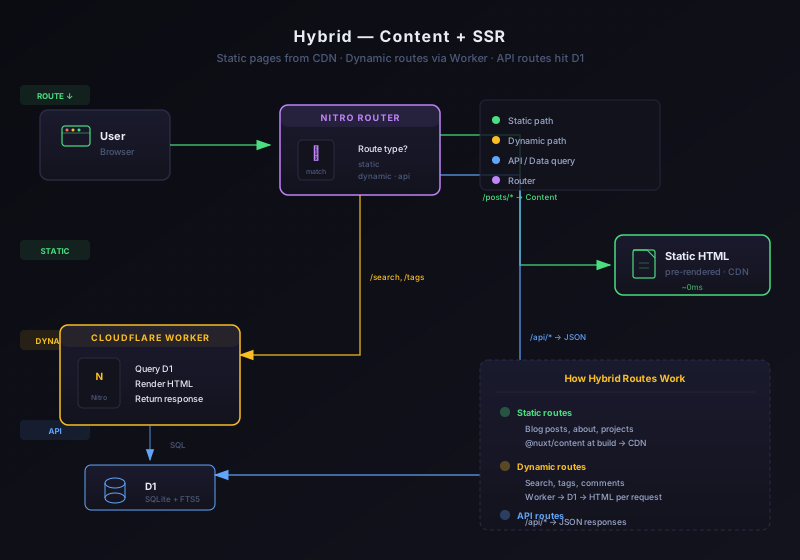
What it is: This blog. Static content (posts, about, projects) + dynamic features (comments, email subscription, view counting, search, newsletter).
Why Hybrid:
- Blog posts are markdown, pre-rendered by
@nuxt/contentat build time - Comments, subscriptions, and search need D1 (server-side database)
- Newsletter sending needs API routes
- 80% of page views hit static content, 20% hit dynamic routes
What I learned:
- Hybrid is the right choice for a blog with dynamic features, but the config was the hardest of the three.
- The
@nuxt/contentmodule handles static pages. Everything inserver/api/goes through the Worker. Making sure they don't conflict took trial and error. - If I didn't need comments, subscriptions, or search — I'd use SSG and save myself the complexity.
30-Second Decision Cheat Sheet
| Your situation | Mode | Why |
|---|---|---|
| Blog, portfolio, docs — same for everyone | SSG | No server needed, CDN does the work |
| Need auth, personalization, per-user content | SSR | Server runtime required |
| Content site + a few dynamic features (comments, search) | Hybrid | Static where possible, dynamic where needed |
| 800+ pages and growing | Consider Hybrid | SSG build time will kill you |
| Need API routes but most pages are static | Hybrid | API on Worker, content on CDN |
| Just starting out, not sure | SSG | Start simple, upgrade later |
The golden rule: Default to SSG. Add SSR only when you have a concrete reason. Choose Hybrid when you can clearly split your routes into static and dynamic.
Further Reading
- Nuxt 4 on Cloudflare: Three Deployment Modes and When to Use Each — the deep-dive config guide for each mode
- Why I Bet My Indie Project on Cloudflare Instead of a Server — the infrastructure decision behind all three projects
- Running a Zero-Cost SaaS with Nuxt and Cloudflare — how the cost structure works at scale
Frequently asked questions
When is SSG the wrong choice? When content changes without a rebuild, when pages depend on per-request data, or when you need personalization. Build-time output cannot respond to anything that happens after the build.
When is SSR overkill? When the content is fixed and the traffic is cacheable. Paying a function invocation for a page that never changes buys flexibility you are not using.
Is hybrid mode worth the extra complexity? It is for this blog, because some routes are static and some need a database. The tradeoff is that you now maintain two rendering paths and need to know which one a given route uses.
How do I pick a mode quickly? Answer three questions: does the data change per request, does it change per deploy, and where does it live. Those three answers point at one of the modes without needing the full comparison.