TL;DR
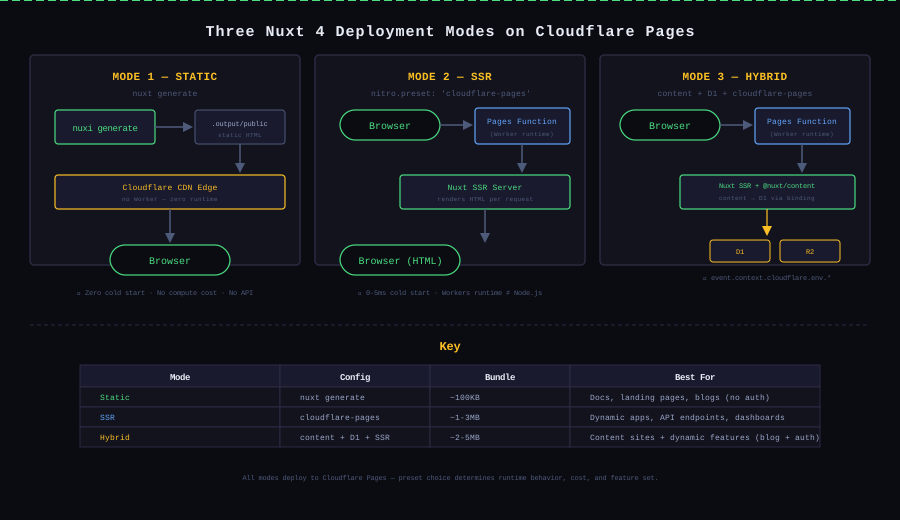
Nuxt 4 deploys to Cloudflare Pages in three distinct modes, each controlled by the Nitro preset in nuxt.config.ts. I run three separate sites, each using a different mode:
| Mode | Preset / Command | Bundle | Runtime | API Support | Cold Start |
|---|---|---|---|---|---|
| Static | nuxt generate | ~100KB HTML only | None | ❌ | None |
| SSR | nitro.preset: 'cloudflare-pages' | ~1-3MB Worker | Workers | ✅ | 0-5ms |
| Hybrid | cloudflare-pages + @nuxt/content + D1 | ~2-5MB Worker | Workers | ✅ | 0-5ms |
The preset choice determines whether your site has a server runtime, how it accesses data, and what infrastructure you need to maintain. Each mode has trade-offs that only become obvious when you hit their specific boundaries.
Background: Three Sites, Three Modes
I didn't plan to run three deployment modes. Each one emerged because the project's needs outgrew the previous mode's limits.
BulkPicTools (Static mode) — a batch image processing tool chain with 50+ tools and 700+ pages. Every page is the same for every user. No auth, no persistence, no server-side logic. Static deployment was the natural fit, and it stayed static for six months before I needed to reconsider.
AIFindr (SSR mode) — an AI tools directory that needed per-request ad platform routing (wwads for Chinese users, AdSense for everyone else) and server-side metadata handling. Static mode couldn't deliver different content per user, so I built it with SSR from the start.
kbmjj123.cc (Hybrid mode) — this blog. It has static content pages (blog posts via @nuxt/content), dynamic features (email subscription with D1, comment system, view counting), and API routes for the newsletter and Telegram bot. Neither pure static nor pure SSR covered the full requirement set — I needed the content module to handle markdown at build time while the server routes hit D1 at runtime.
This article covers the config, the gotchas, and the boundaries of each mode from real usage — not from reading docs.
Mode 1: Static (nuxt generate)
The Setup
Static mode is the simplest. In nuxt.config.ts, you either set ssr: true with devtools: { enabled: true } and build with nuxt generate, or set ssr: false for an SPA-like output. The difference:
ssr: true+nuxt generate→ pre-renders every route to HTML at build time. Each page is a complete HTML file in.output/public/.ssr: false→ outputs a singleindex.htmlthat loads the JS bundle and renders client-side. SEO suffers because crawlers see an empty shell before JavaScript executes.
I use ssr: true + nuxt generate for BulkPicTools. With 700+ pages, a full build takes about 10 minutes on Cloudflare Pages. Every page becomes a static file served from the CDN edge with zero runtime cost.
// nuxt.config.ts — Static mode
export default defineNuxtConfig({
  ssr: true,
  // No nitro.preset → default static output
  nitro: {
    output: {
      dir: '.output',
    },
  },
})
The deployment is just pointing Cloudflare Pages at the git repo and setting the build command to nuxt generate with output directory .output/public.
The Gotcha: autoSubfolderIndex
When Cloudflare Pages serves a static site, it maps /about/ to /about/index.html by default. But if your Nuxt app generates /about/index.html and the browser requests /about (no trailing slash), Cloudflare's default behavior creates a redirect chain: /about → /about/ → /about/index.html. This doesn't break functionality, but it adds an unnecessary redirect that wastes a crawl budget and can confuse link equity distribution.
The fix is in nuxt.config.ts:
nitro: {
  preset: 'cloudflare-pages',
  autoSubfolderIndex: false,
}
This tells Nitro to generate /about.html instead of /about/index.html, so Cloudflare serves it directly on /about without a redirect. I found this while debugging GSC crawl reports showing "redirected" status on pages that shouldn't redirect.
When Static Isn't Enough
Static mode breaks when you need to:
- Serve different content per user (ad platform routing, A/B testing)
- Read data from a database at request time (comments, view counts)
- Handle form submissions or webhooks server-side
For AIFindr, the breaking point was ad platform routing: Chinese users need wwads, everyone else gets AdSense. Static mode can't make that decision at request time. That's when I added SSR.
Mode 2: SSR (nitro.preset: 'cloudflare-pages')
The Setup
Switching to SSR means adding the Nitro preset for Cloudflare Pages:
// nuxt.config.ts — SSR mode
export default defineNuxtConfig({
  ssr: true,
  nitro: {
    preset: 'cloudflare-pages',
    compatibilityDate: '2026-04-01',
  },
})
The build command changes from nuxt generate to nuxt build. The output is no longer static HTML — it's a Workers bundle in .output/server/ that runs on Cloudflare's Workers runtime (not Node.js). Every incoming request hits the Worker, which runs Nuxt's SSR logic and returns rendered HTML.
Three changes matter when switching from static to SSR:
1. Compatibility Date — Nitro uses a compatibility date to decide which Workers runtime features to enable. Set it explicitly. Without it, newer Workers APIs may not activate, and some older default behaviors may cause unexpected errors.
2. Build Time Increases — Static build for 700 pages: 10 minutes. SSR build: ~2-3 minutes (one bundle, no pre-rendering). Counterintuitive: SSR is actually faster to build when you have many pages.
3. Route Rules Still Enable Static Pre-rendering — You don't have to SSR every page. routeRules let you mix:
routeRules: {
  '/': { prerender: true },
  '/tools/**': { swr: 3600 },
  '/api/**': { ssr: true },
}
I use this to keep high-traffic landing pages as static files while the ad-routing API routes run on Workers.
The Gotcha: Workers Runtime ≠ Node.js
The biggest surprise: the Workers runtime is not Node.js. It's a custom runtime based on the Service Worker API. Standard Node.js globals like fs, net, child_process don't exist. Buffer is available in recent compatibility dates, but require() is not.
I hit this when trying to use sharp for server-side image metadata extraction. Sharp uses native C++ bindings compiled for Node.js — they don't run on Workers. The build succeeded locally but failed on Cloudflare with Module not found: 'sharp' in the Worker logs.
The solution was replacing sharp with a Workers-compatible approach: client-side Canvas-based extraction (for BulkPicTools, the images are already in the browser, running extraction there avoids the problem entirely) or using a WebAssembly-based library that doesn't depend on native modules.
If you're evaluating SSR mode, audit your npm dependencies against the Workers runtime compatibility list first. Anything using native bindings (bcrypt, sharp, node-canvas) won't work.
Mode 3: Content + SSR Hybrid (@nuxt/content + D1 + cloudflare-pages)
The Setup
This is the mode powering kbmjj123.cc. It combines @nuxt/content for Markdown-based blog posts with server routes that access D1 and R2 through Cloudflare's binding system.
// nuxt.config.ts — Hybrid mode (kbmjj123.cc)
export default defineNuxtConfig({
  modules: ['@nuxt/content', '@nuxtjs/seo'],
  nitro: {
    preset: 'cloudflare-pages',
    compatibilityDate: '2026-04-01',
    rollupConfig: {
      // preserve modules needed for Workers compatibility
    },
  },
  content: {
    // Content module reads from local filesystem at build time
    // At runtime, D1 binding provides the data layer
  },
})
The wrangler configuration ties the Cloudflare bindings to the local development environment:
// wrangler.jsonc
{
  "name": "kbmjj123-cc",
  "pages_build_output_dir": ".output/public",
  "d1_databases": [
    {
      "binding": "DB",
      "database_name": "kbmjj123-cc-db",
      "database_id": "xxxxxxxx-xxxx-xxxx-xxxx-xxxxxxxxxxxx"
    }
  ],
  "r2_buckets": [
    {
      "binding": "ASSETS",
      "bucket_name": "kbmjj123-cc-assets",
      "bucket_name": "kbmjj123-cc-assets" // intentional — shows the duplicate trap
    }
  ]
}
The key distinction in hybrid mode: @nuxt/content reads Markdown from the filesystem during the build to generate pages, while server routes (API endpoints for email subscription, comments, Telegram webhook) read and write to D1 at runtime. The content module handles static content; D1 handles dynamic data.
Gotcha 1: GitHub Auto-Deploy Overwrites Environment Variables
When you connect a Cloudflare Pages project to a GitHub repository, every git push triggers an automatic deployment. Each deployment reads the environment variables from two sources: the Cloudflare dashboard settings and the wrangler.toml / wrangler.jsonc in the repository.
The problem: if wrangler.jsonc doesn't explicitly define the [vars] section (or if the build configuration doesn't include the keep-vars flag), the deployment process treats dashboard-set variables as "not in config" and overwrites them with empty values. You end up with production environment variables resetting to blank on every push.
I noticed this when the email subscription system stopped sending verification emails after a routine CSS update. The RESEND_API_KEY variable that I'd set in the Cloudflare dashboard was gone after the deployment. Checking the deployment logs showed no error — the build succeeded — but the Worker couldn't read the key because it had been wiped.
The fix: in the Cloudflare Pages dashboard, go to the project settings → Environment variables → explicitly check "Encrypt" for secrets and ensure the wrangler configuration's [vars] section matches what the dashboard expects. Or, alternatively, manage all variables exclusively through wrangler secret put and keep the wrangler config minimal:
npx wrangler pages secret put RESEND_API_KEY
npx wrangler pages secret put ADMIN_SECRET
This avoids the sync conflict because wrangler secret writes directly to Cloudflare's API without depending on the config file.
Gotcha 2: Server-Side D1/R2 Access — event.context.cloudflare.env Is the Only Way
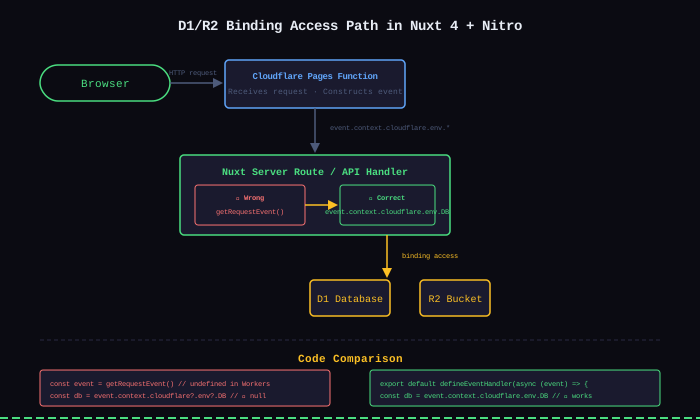
This was the deepest trap. In Nuxt 4 / Nitro, accessing Cloudflare bindings (D1, R2, KV) from a server route is not the same as accessing them from a Node.js environment. The standard h3 approach — getRequestEvent() — does not work.
Here's what I tried first (wrong):
// ❌ Wrong — returns undefined in Workers runtime
import { getRequestEvent } from 'h3'

export default defineEventHandler(async () => {
  const event = getRequestEvent()
  const db = event?.context?.cloudflare?.env?.DB
  // db is undefined — getRequestEvent() doesn't have cloudflare bindings
})
I spent hours adding console.log calls to debug this, deployed to preview, checked Workers logs — every path through getRequestEvent() returned undefined for cloudflare.env. The event object exists, but the cloudflare property isn't populated when using getRequestEvent() in a nested call context.
The correct approach is to use the event parameter passed directly by defineEventHandler:
// ✅ Correct — use the event parameter directly
export default defineEventHandler(async (event) => {
  const db = event.context.cloudflare.env.DB
  const bucket = event.context.cloudflare.env.ASSETS
  // db and bucket are fully functional D1 and R2 bindings
})
I found this documented in the Nitro deployment guide for Cloudflare, not in the Nuxt content module docs. The pattern is specific to Nitro's Cloudflare preset — when Nitro builds the server bundle for Workers, it injects the bindings into event.context.cloudflare.env as part of the request lifecycle.
For a concrete example — querying the blog's post metadata from D1:
export default defineEventHandler(async (event) => {
  const db = event.context.cloudflare.env.DB

  const { results } = await db.prepare(
    'SELECT slug, title, date, views FROM posts ORDER BY date DESC LIMIT 10'
  ).all()

  return results
})
The event.context.cloudflare.env.DB is the D1 binding object — no import needed, no client initialization. Cloudflare injects it into the Worker environment automatically when the binding name matches what's configured in wrangler.jsonc.
How to Choose
Based on running all three modes in production, here's the decision framework:
Does your project need server-side logic?
├── No → Static mode
│   ├── nuxt generate
│   ├── Zero cost, zero cold start
│   └── Limit: can't serve per-user content
│
├── Yes → Can your dependencies run on Workers?
│   ├── Yes → SSR mode
│   │   ├── nitro.preset: 'cloudflare-pages'
│   │   └── Watch out: no Node.js native modules
│   │
│   └── No → SSR mode + move native ops to client
│       └── Replace native packages with Web APIs
│
└── Need content management + dynamic data → Hybrid mode
    ├── @nuxt/content + D1 + SSR
    ├── Most complex, most gotchas
    └── Local debug with wrangler.jsonc, prod via bindings
My Take
Three modes, three real sites, and one conclusion: the preset choice isn't about "what Nuxt can do" — it's about where your project's data lives.
Static mode is the most honest: if your content doesn't change per request, don't run code per request. BulkPicTools has been static for six months, handling 5k+ daily UV with zero infrastructure cost. When I needed per-request ad routing for a different project (AIFindr), I built it with SSR from scratch — a separate site with its own config, not a migration of the static one.
SSR mode on Workers is not a "serverless Node.js." Treating it as such causes the sharp/bcrypt issues. The Workers runtime is closer to a browser Service Worker than to Node.js. Plan your dependencies around that constraint.
Hybrid mode is the most capable and the most expensive in debugging time. The event.context.cloudflare.env binding pattern is well-documented in Nitro's deployment guide but not obvious when you start from @nuxt/content's documentation. The D1 binding setup requires alignment between three separate config surfaces: wrangler.jsonc, Cloudflare dashboard, and nuxt.config.ts. If any one is misaligned, the binding silently doesn't exist.
The real cost of hybrid mode isn't compute — it's the local debugging complexity. Static mode you can preview locally with a simple nuxi preview. Hybrid mode requires wrangler pages dev, a running local D1 instance, and matching binding names between local and production configs. The feedback loop for debugging a D1 query goes: write code → commit → deploy → check logs → fix → repeat. There's no local step-through debugger for Workers-bound D1 queries in Nuxt's dev server.
Result
All three modes are running in production:
| Site | Mode | Daily Traffic | Cost |
|---|---|---|---|
| BulkPicTools | Static | 5k+ UV | $0 (domain only) |
| AIFindr | SSR | < 1k UV | $0 (Workers free tier) |
| kbmjj123.cc | Hybrid | < 1k UV | $0 (domain only) |
No infrastructure bill across any mode. The cost is in configuration complexity, which scales inversely with how much the project actually needs runtime features.
Lessons Learned
- Match the preset to where your data lives, not what's trendy. Static is not "less capable" — it's the right choice when your data doesn't change per request. Adding SSR before you need it just adds cold starts and dependency audit work.
event.context.cloudflare.envis the binding access path. NotgetRequestEvent(). NotuseRuntimeConfig(). If you're writing a server route on the Cloudflare preset and can't access D1, check which event object you're reading. The parameter directly passed bydefineEventHandleris the one that has the bindings.- Wrangler config, dashboard config, and nuxt.config must agree. D1/R2 bindings, environment variables, and compatibility dates need to match across
wrangler.jsonc, the Cloudflare dashboard, andnuxt.config.ts. A mismatch produces silent failures — the build succeeds, the Worker deploys, but the binding isundefinedat runtime. - GitHub integration wipes unconfigured environment variables. If you connect a repo to Cloudflare Pages without the
[vars]section in wrangler config, every push resets your dashboard-set variables. Usewrangler pages secret putfor secrets and document the variable list as an explicit source of truth. - Static builds scale inversely with page count; SSR builds are constant. At 700+ pages,
nuxt generatetakes 10 minutes. Thenuxt buildfor SSR takes ~2-3 minutes regardless of page count. Consider this when your site grows — the build time graph intersects the complexity graph at a point that may surprise you.
This post is part of a series comparing Nuxt 4 deployment strategies. Related: Running a Zero-Cost SaaS with Nuxt and Cloudflare (static mode in depth) and Building a Pixel Email Subscription System for kbmjj123.cc (hybrid mode in practice).