TL;DR
GitHub's OAuth callback wasn't reaching my local dev server — a network environment problem, not a code bug. Instead of reaching for a tunneling tool, I built a single dev-only endpoint that returns a fake "logged in" response, so the rest of the app could keep moving.
Background
My second project needs GitHub login. Straightforward in theory: redirect to GitHub, user authorizes, GitHub calls back to my app with a code, I exchange it for a token. I'd built this flow before. The problem wasn't the flow — it was the environment I was building it in.
The Problem
Locally, the redirect to GitHub's authorization page worked fine. The user could see the GitHub consent screen, approve access — and then nothing. The callback that's supposed to land back on my local dev server never arrived in any usable way. No error in my app, no obvious stack trace pointing at "this line is broken." From the app's point of view, it just stalled at the point where it should have received the user back.
Investigation
The first thing I ruled out was my own code. The callback route existed, it was wired up correctly, and the same logic worked once deployed. That narrowed it down fast: this wasn't a logic bug, it was a reachability problem between GitHub's servers and my local machine, specific to developing from inside China's network environment.
At that point I looked at the two realistic options:
- A network tunnel (something like ngrok or frp) to expose my local dev server with a public URL GitHub's callback could actually reach.
- A mock login endpoint — skip the real OAuth round trip entirely during local development, and short-circuit straight to "user is logged in" with fake data.
I didn't spend long evaluating the tunnel option in depth, and that was a deliberate call, not an oversight: setting one up means installing or configuring an extra tool, keeping it running alongside my dev server, and trusting that traffic flows reliably enough not to introduce a second source of flakiness on top of the original problem. For a feature where I just need "is the user considered logged in or not" to build the rest of the app, that's a lot of moving parts for the actual question I'm trying to answer.
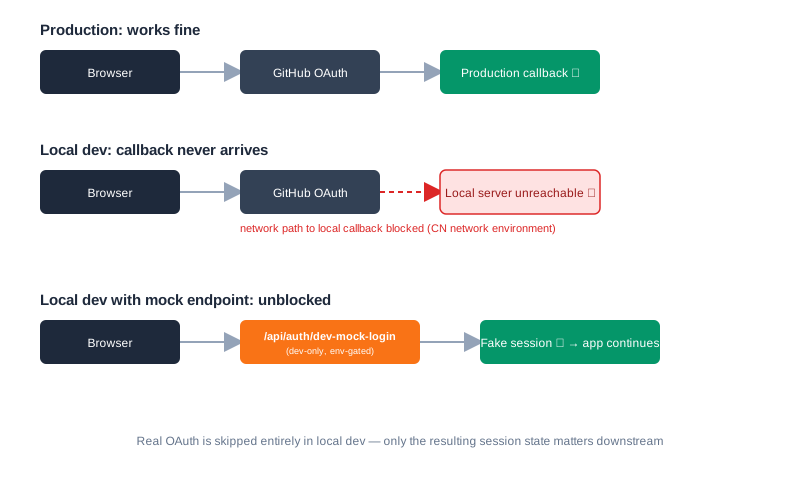
Here's the difference between the three states laid out side by side — what works in production, where it breaks locally, and where the mock endpoint steps in:
Solution
I added a single endpoint that only exists in development, gated behind an environment variable check, that returns a mocked "successful login" payload — the same shape my real callback handler would produce after a successful GitHub exchange.
// pages/api/auth/dev-mock-login.ts
// Only registered when running in a development environment.
// Returns the same session shape the real GitHub OAuth callback would produce.

export default defineEventHandler((event) => {
  if (process.env.NODE_ENV !== 'development') {
    throw createError({ statusCode: 404 })
  }

  // <PLACEHOLDER: real mock user payload + session creation logic>
  // e.g. setUserSession(event, { id: 'dev-user', name: 'Local Dev', ... })

  return { ok: true }
})
With that in place, the rest of my app — anything depending on "the user is logged in" — could be built and tested locally without ever touching GitHub's real OAuth flow during development.
My Take
I chose the mock endpoint over a tunnel because of what I actually needed versus what a tunnel gives you. A tunnel solves "make my local server reachable from the internet" — which is a real solution, but it's solving a more general problem than the one in front of me. I didn't need GitHub to be able to reach my machine in general; I needed the rest of my app to behave correctly when a user is logged in.
There's also a timing argument here that matters more than the technical one: I'm working with limited time, trying to get a working product out, not trying to build the most architecturally faithful local dev environment. A tunnel is the right tool when the integration itself is what you're testing — for example, I expect to reach for exactly that approach later when integrating ads locally, where the actual request/response behavior of a third party matters. For OAuth login, where the third-party exchange itself isn't what I'm debugging, faking the outcome was the faster, lower-risk path to the same result.
Result
Local development stopped blocking on the OAuth callback entirely. Everything downstream of "user is logged in" — protected routes, user-specific data fetching, UI states — could be built and verified without depending on GitHub's servers or my network path to them.
Lessons Learned
- When a third-party callback doesn't reach your local environment, check whether it's a network/environment issue before assuming it's your code.
- A tunneling tool isn't free even when it's free to install — it's another moving part to maintain and trust.
- If what you actually need is "pretend this dependency succeeded," a dev-only mock is often cheaper than making the real dependency reachable.
- Save tunneling for cases where the integration behavior itself is what you're testing — not every local-dev blocker needs the same fix.
- Gate dev-only endpoints behind an environment check so they can never accidentally ship to production.
Part of the "Going Serverless" series. Previous: Why I Bet My Indie Project on Cloudflare Instead of a Server · Next: Two Days, One Broken Monitor, and a Forced macOS Upgrade Just to Run Wrangler