The short version: one tool, $29/month, driven from my phone
I use Claude Code from my phone. While watching my kid. While waiting for coffee. Before bed, I kick off a translation task and wake up to find it done. The total cost: $29/month — Claude Code CLI (free), DeepSeek API ($27/month), and a mini PC running 24/7 ($2/month in electricity).
I stopped chasing AI coding tools two months ago. No Cursor, no Copilot, no "let me try this new thing." The time I used to spend evaluating tools now goes into building my product. One tool, used deeply, beats ten tools explored shallowly.
This post isn't a tutorial. It's the philosophy behind my setup — and how you can replicate it in 5 minutes.
The Moment It Clicked
Last Tuesday, I was watching my kid at a playground. My phone buzzed — a GitHub issue notification. A CSS layout bug on mobile. Normally, this would wait until I got home, sat down at my desk, opened my laptop, and fixed it.
Instead, I pulled out my phone, opened a browser tab, and typed into Claude Code:
"Check the mobile layout on the
/projectspage. The cards are overflowing on 375px screens."
By the time my kid came down the slide, the fix was committed and deployed.
That's when I realized: the real unlock isn't a better AI model. It's removing the constraint of "you must be at your desk to use it."
Why I Quit Cursor
I used Cursor's free tier for a while. When it started asking for $20/month, I looked at what I actually needed: a terminal, file access, and an AI that could read my codebase. Claude Code CLI gave me all of that for free. I didn't need to "try" five other tools to be sure — I just needed one that worked.
The decision took 10 minutes. I've spent zero minutes reconsidering it since.
My Setup: Three Components, $29/Month
Here's what I run:
| Component | What it does | Cost |
|---|---|---|
| Claude Code CLI | AI coding agent in the terminal | Free |
| DeepSeek API | Daily coding backend (API key) | ~$27/month |
| Mini PC | Always-on home server | ~$2/month electricity |
| Total | ~$29/month |
That's it. No cloud IDE subscription, no SaaS platform, no "pro plan" upsell.
Why DeepSeek?
DeepSeek handles about 80% of my daily coding tasks. It's not Claude Opus, but it doesn't need to be. For routine work — writing functions, fixing bugs, refactoring code — it's solid. I'd rate it 8/10 for coding, as long as you give it clear direction.
Here's my actual API cost breakdown after 2 months:
| Month | Tokens Used | Cost |
|---|---|---|
| Month 1 | ~15M input, ~3M output | ¥180 (~$25) |
| Month 2 | ~20M input, ~4M output | ¥220 (~$30) |
That's 4+ hours of daily usage. Compare that to Claude's API at $3/$15 per million tokens — the same usage would cost $60-90/month. DeepSeek is roughly 3x cheaper for coding tasks.
Configuration is dead simple. Two environment variables:
export ANTHROPIC_AUTH_TOKEN=your_deepseek_api_key
export ANTHROPIC_BASE_URL=https://api.deepseek.com/anthropic
No SDK changes, no wrapper libraries. Claude Code CLI speaks the Anthropic protocol, and DeepSeek's API is compatible. It just works.
Where DeepSeek falls short:
- Context window is smaller (~64K vs Claude's 200K) — large codebases need more careful prompting
- Complex reasoning (multi-file refactoring, architecture decisions) is noticeably weaker
- Occasionally hallucinates API signatures — always verify generated code
For complex tasks (architecture decisions, deep debugging), I first discuss the approach in DeepSeek's chat app, confirm the direction, then execute it through Claude Code. This two-step process saves tokens and avoids wasted iterations. (I wrote about my Claude Code + DeepSeek workflow in more detail if you're curious.)
Why a Mini PC?
I have a mini PC that runs 24/7. It consumes about 20W on average — that's 14.4 kWh per month, or roughly $2 in electricity. It's always on, always connected, always ready. No cloud VM fees, no "your instance has been stopped" emails.
The Killer Feature: Claude Code on Your Phone
This is the part that changed everything for me.
I tried various remote desktop and terminal apps to access Claude Code from my phone. Most of them were clunky — tiny text, awkward gestures, poor mobile rendering. Then I found a setup that actually works:
Cockpit — an open-source web-based server management tool. One command to install, one command to start. It gives you a clean web terminal (default port 3001, configurable).
Tailscale — a mesh VPN that makes your home network accessible from anywhere. One command to install, one click to connect.
The full chain:
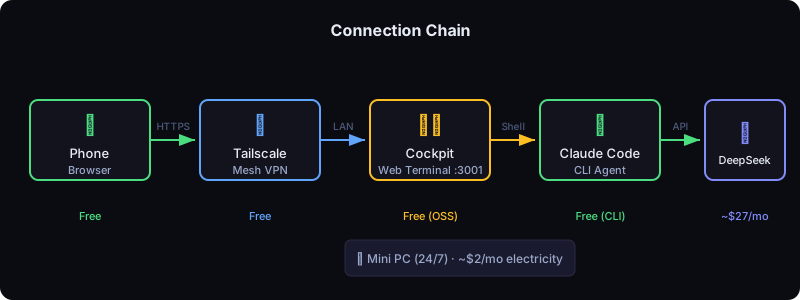
Phone → Tailscale → Cockpit (port 3001) → Claude Code CLI
That's the entire infrastructure. Two tools, both one-command installs.
What It Feels Like on Mobile
The experience is surprisingly good. Cockpit's web terminal renders cleanly on a phone screen. Here's the actual workflow:
- Open your phone browser, navigate to your Cockpit URL
- Log in — you're greeted with a clean web interface
- Select a project from your pre-added list (each project is a separate Claude Code session)
- Start chatting — type prompts like you're sending a message
That's it. No terminal commands to remember, no SSH keys to manage. It's a chat interface for your codebase.
You get:
- Multiple projects — switch between different codebases with a tap
- Persistent sessions — close the browser, come back later, the conversation is still there
- Background tasks — kick off a long-running agent, close the tab, check results later
Real Scenarios from My Week
Watching my kid at the playground. A CSS bug report comes in. I fix it from my phone in 3 minutes.
Waiting for coffee. I ask Claude Code to research GSC API integration for my blog's SEO pipeline. By the time I sit down at my desk, there's a working prototype.
Before bed. I kick off a translation task for a batch of blog posts. I don't wait for it to finish — I just close the browser. When I wake up, the task is done, the files are updated, and the commit is pushed.
Lunch break. I brainstorm product ideas with Claude Code. Not coding — just thinking out loud, exploring possibilities, validating assumptions. The kind of work that used to require "being in the zone" at my desk.
The Philosophy: One Tool, Deep Mastery
Here's what I believe: the time you spend evaluating AI tools is time you're not spending on your product.
I know developers who've tried Cursor, Copilot, Windsurf, Cline, Aider, Continue, and half a dozen others. They spend weekends configuring, comparing, switching. They have opinions about which one is "best."
I don't have those opinions. I have a product.
This isn't about Claude Code being the "best" tool. It's about the cost of context-switching. Every time you switch tools, you lose:
- The muscle memory you built
- The workflow optimizations you discovered
- The mental model of how the tool thinks
Pick one. Go deep. The compound returns of mastery outweigh the marginal gains of switching.
The $20 vs $29 Question
"But Cursor is only $20/month. Your setup costs $29."
True. But my $29 buys me:
- Mobile access — use Claude Code from anywhere
- No artificial limits — no "you've used your 500 fast requests"
- Full file system access — read any file, run any command
- Extensibility — MCP servers, custom scripts, whatever I want
- No vendor lock-in — it's just a terminal; I can swap the API backend anytime
The extra $9 is the cheapest upgrade I've ever bought.
It's Not Perfect
I want to be honest about the trade-offs:
Long-running agents can hang. When Claude Code spawns an agent that runs for 10+ minutes, it sometimes gets stuck. I've learned to check progress occasionally rather than "fire and forget."
Complex tasks still need a desktop. If I'm doing deep architectural work or debugging a tricky race condition, I want a real keyboard and multiple monitors. The phone is for quick tasks, research, and kicking off background work.
It requires a always-on machine. If your mini PC crashes or loses internet, your workflow stops. I've had this happen twice in two months — both times, a quick SSH restart fixed it.
But these are minor compared to the alternative: only being able to use AI when I'm sitting at my desk.
Two Months In: What I Actually Use It For
I've been running this setup for over 2 months now. Here's what surprised me:
My Top 3 use cases (by frequency):
- Bug fixes — 40% of my usage. A bug report comes in, I fix it from my phone. Average time: 5 minutes.
- Research & prototyping — 30%. "Research how to integrate X API, write a proof of concept." I kick these off during lunch and review results later.
- Writing & documentation — 20%. Blog posts, README files, API docs. Claude Code is surprisingly good at technical writing.
What I expected but didn't happen:
- I thought I'd use it for complex architecture work. I don't — that still happens at my desk with multiple monitors.
- I thought the phone keyboard would be a bottleneck. It isn't — prompts are short and conversational.
What I didn't expect but love:
- The "set it and forget it" pattern. Before bed, I kick off a task. Wake up, check results. This alone has accelerated my project by weeks.
- The reduced context-switching cost. Before, a bug report meant "I'll fix it later." Now I fix it in the moment. Less mental load, faster iteration.
Biggest surprise: The quality of my prompts has improved. Typing on a phone forces me to be concise. Concise prompts get better results. It's a feature, not a bug.
Quick Start: 5 Minutes to Replicate
If you want to try this setup, here's the minimum viable version:
1. Install Claude Code CLI
# Install Node.js if you haven't
curl -fsSL https://fnm.vercel.app/install | bash
fnm install --lts

# Install Claude Code
npm install -g @anthropic-ai/claude-code
2. Get a DeepSeek API Key
Sign up at platform.deepseek.com, create an API key, and set it:
export ANTHROPIC_AUTH_TOKEN=your_deepseek_api_key
export ANTHROPIC_BASE_URL=https://api.deepseek.com/anthropic
3. Install Cockpit
# Ubuntu/Debian
sudo apt install cockpit
sudo systemctl enable --now cockpit.socket
Access it at https://your-machine-ip:3001. The terminal is built in.
4. Install Tailscale
curl -fsSL https://tailscale.com/install.sh | sh
sudo tailscale up
Install Tailscale on your phone too (App Store / Play Store). Both devices join the same network.
5. Add Your Projects
On your desktop, add the projects you want to access remotely:
# Navigate to your project
cd /path/to/your/project

# Start Claude Code — it will remember this project
claude
Each project you start Claude Code in becomes available in the web interface.
6. Access from Your Phone
Open your phone browser, go to https://your-tailscale-ip:3001, log in, select a project from the list, and start chatting.
That's it. You now have Claude Code in your pocket.
Who Is This For?
- Indie developers who want to squeeze productivity out of fragmented time
- Parents who can't always be at their desk but want to keep projects moving
- Remote workers who want AI access during commutes, coffee breaks, or lunch
- Anyone who's tired of "I'll do it when I get to my computer"
You don't need to be a sysadmin. You don't need a powerful machine. You just need a spare computer, a terminal, and the willingness to stop switching tools.
The Bottom Line
I used to think productivity meant finding the right tool. Now I think it means finding one tool and removing every barrier between you and using it.
Claude Code on my phone removed the biggest barrier: location.
The next time you're waiting in line, watching your kid, or lying in bed — ask yourself: what could I build if I had my AI coding assistant right now?
With this setup, you do.
Frequently asked questions
Can you really run Claude Code from a phone? Yes, if the terminal is reachable. The setup that worked for me was a phone-accessible terminal session against a machine running Claude Code, so the phone is an input device rather than the computer doing the work.
Why drop Cursor for Claude Code? It came down to what I was paying for. I needed a terminal and a model, not an editor subscription, and the $20/month was buying interface rather than capability.
Is $29/month worth it for a side project? It depends on how much fragmented time you have. The value is not speed at a desk — it is being able to use the ten minutes waiting for coffee, which is time that was previously wasted.
What is this setup bad at? Anything needing a real review pass. Phone sessions are good for starting tasks, fixing small bugs, and kicking off background work; they are not where I make architectural decisions.