TL;DR
One model can't do everything—at least not reliably when you're on a zero budget. I split AI coding into three layers using only free tiers: Claude for planning, DeepSeek for execution, and myself for judgment. Total cost: $0. The setup keeps working even when one model goes down.
Background
Six months into building indie products. Nights and weekends. Full-time job during the day.
I rely on AI to move faster. But when every tool has to be free, no single model is reliable enough on its own. Free tiers disappear, accounts get flagged, quotas change without warning. The workflow needs to survive those failures.
The Problem
Using one model for everything creates a single point of failure.
When I started, I used Claude for everything—planning, coding, debugging, research. The free Chat interface was solid. But free access isn't guaranteed. Limits change. Accounts can get restricted.
The real problem wasn't Claude specifically. It was the structure. When one model handles every type of task, losing access means losing your entire workflow. Not just coding—also planning, research, debugging.
I needed a setup where no single failure could stop me from shipping.
Investigation
I didn't jump straight to a multi-model workflow. I tried the obvious paths first.
Claude-only was great—until access became unreliable
Claude's free Chat gave me the best code quality. Things ran on the first or second try. Reasoning was strong. Product decisions made sense.
But free access is a privilege, not a right. Every time access broke, so did my momentum. I wasn't willing to bet months of indie work on a single free tier staying available.
DeepSeek-only was free but cost me debugging time
DeepSeek's free Chat was the obvious backup. For scaffolding, repetitive fixes, and small scoped tasks, it was good enough.
But when I tried using it as my only model, two problems surfaced:
- Code needed 3–4 rounds of debugging before it worked. A typical multi-file feature would look right on first glance, then break on integration—wrong import paths, mismatched function signatures, missing props. I'd paste the error back, get a fix, and repeat.
- Web search runs on Baidu. For an English-language tech stack (Nuxt, Cloudflare, Wasm), this was a real blocker. GitHub issues, StackOverflow threads, English documentation—Baidu barely indexes them. The expert model can't search at all.
Gemini was free too—but the quota ran out mid-task
Gemini's free tier looked promising. Code quality was better than DeepSeek in some areas. But the quota was tight enough that I'd hit rate limits in the middle of iterating on a component. Wait an hour, try again, lose my train of thought.
The real insight: planning and execution are different jobs
After testing all three, a pattern emerged:
| Task type | Claude (free) | DeepSeek (free) | Gemini (free) |
|---|---|---|---|
| Architecture & product decisions | Strong | Weak | Okay |
| Multi-file reasoning | Strong | Needs 3–4 rounds | Decent |
| Scaffolding & repetitive code | Overkill | Good enough | Good enough |
| Single-file fixes | Fine | Fine | Fine |
| English web research | Strong | Blocked by Baidu | Okay |
The insight wasn't "Claude is best." It was that planning needs a different kind of intelligence than execution. Trying to use one model for both meant either getting sloppy output on complex tasks or wasting a good planning model on scaffolding.
Solution
I split the workflow into three layers. Each does one job. All free.
Layer 1: Claude for planning
Claude handles the thinking: product direction, architecture, market research, and anything that requires reasoning across multiple trade-offs.
Free Chat interface. No API key, no billing. If it disappears tomorrow, I lose my best planning tool, but the execution pipeline still works.
Layer 2: DeepSeek for execution
DeepSeek handles the doing: scaffolding, utility functions, repetitive fixes, one-off scripts. Tasks where I already know exactly what I want and just need someone to type it out.
Free Chat. I keep tasks small and specific—that's the trade-off for zero cost.
Layer 3: Me for judgment
Every piece of AI output goes through me. I catch the subtle bugs DeepSeek misses. I adjust Claude's plans when they don't fit my constraints.
None of the three layers trusts the others blindly. That's what makes the system work.
How it works in practice: a real example
I used this workflow to optimize the SEO on my AI Image category page.
Step 1: Planning with Claude
# Broad prompt (Claude):
"I have an AI Image category page with 3 tools. Keywords are broad
terms like 'ai image tools.' How should I approach SEO? Should I
add articles, or focus on the tools?"
Claude returned a strategy: the page was too thin for broad keywords, articles would help but only as support, and I should validate with GSC data first.
That was a plan. Not code. Not copy. Just a clear direction.
Step 2: Validate with real data
I exported GSC queries and found the actual user intent. People weren't searching for "ai image tools." They were searching for background remover 2x2 and ai background remover passport photo—specific, narrow queries my existing tools could serve.
Step 3: Execute with DeepSeek
Now I had something concrete:
# Narrow prompt (DeepSeek):
"Rewrite H1, meta description, and intro paragraph for my AI Image
category page. Target passport photo background removal. Page has
3 tools. Under 150 words. GSC queries: 'background remover 2x2'
(320 imp/mo), 'ai background remover passport photo' (180 imp/mo)."
DeepSeek returned draft copy. I tweaked two sentences and deployed.
The key difference: Claude got a broad question and returned a direction. DeepSeek got a narrow task and returned output. When I used to ask one model to do both, the planning was shallow and the execution needed 3–4 rounds of fixes.
My Take
Zero cost means accepting trade-offs—but those trade-offs are manageable
I'm not paying for any of these tools. That's not a brag—it's a constraint. Claude's free Chat can disappear. DeepSeek's free Chat needs debugging. Gemini's free quota is unpredictable.
But "free + predictable limitations" is something I can plan around. I scope tasks small. I review output carefully. I never ask DeepSeek to do anything I couldn't fix myself in 10 minutes.
The alternative—paying for reliability—isn't an option when you're still validating whether your projects will generate anything. Zero cost isn't the goal. It's the reality of indie building at the stage where revenue hasn't arrived yet.
The biggest risk: the planning layer has no free backup that matches Claude
Claude's free Chat is the cornerstone. If that changes—stricter limits, account restrictions—I don't have a free alternative that matches its reasoning quality. DeepSeek can't fill that gap; its reasoning isn't strong enough and its search is limited to Baidu. Gemini's quota is too tight.
This is the unsolved piece. For now, I can still ship without a planning layer—I just have to think harder on my own. But it's the single biggest weakness in this setup, and I'm not going to pretend otherwise.
Result
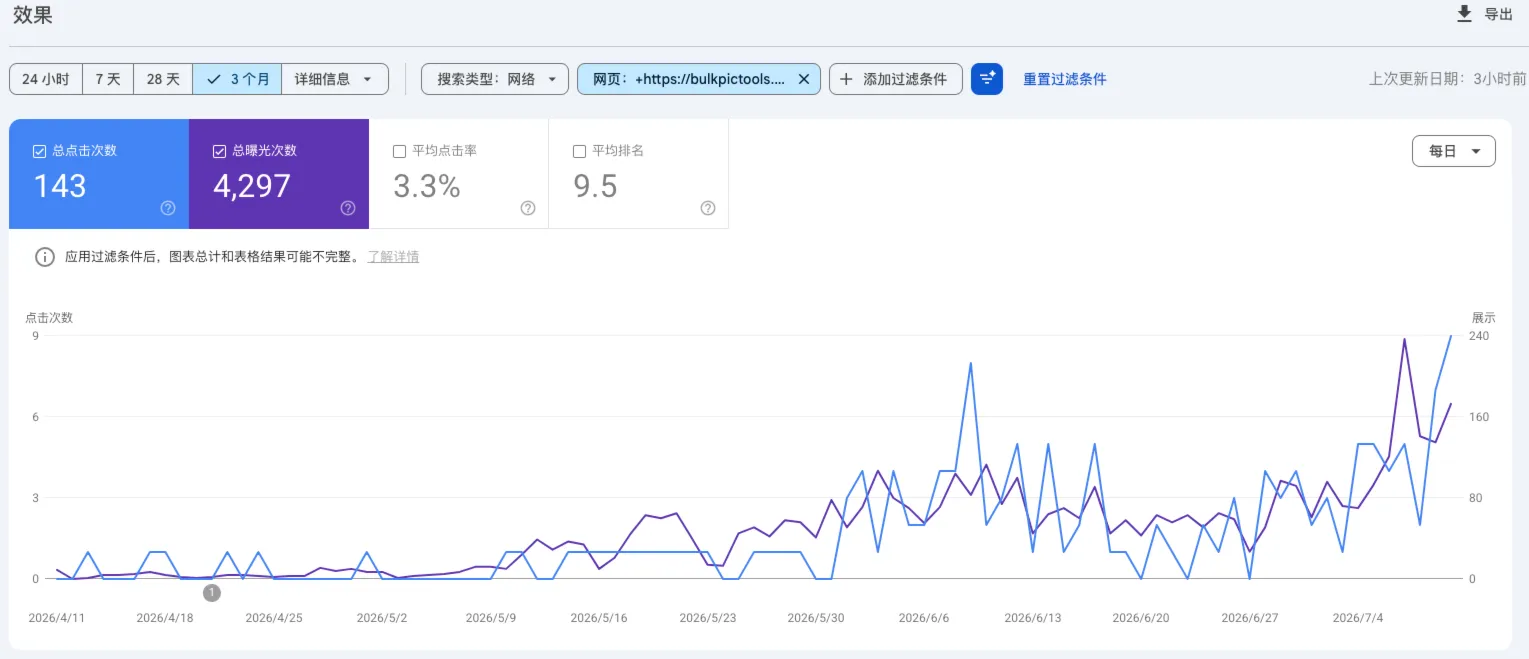
The SEO case is ongoing. I shipped the changes but don't have clean before/after data yet. I'll update this section when the numbers are clear.
What I can say: splitting planning from execution turned "I should improve SEO" into a concrete task I shipped in one evening. That alone was worth the workflow change.
Lessons Learned
- Planning and execution are different jobs. Give planning to the model that reasons well. Give execution to the model that's fast enough. Mixing them in one conversation produces worse output from both.
- Free tiers mean zero SLA. Build around the assumption that any free model can disappear tomorrow. Your workflow should survive the loss of any single component.
- "Free per token" isn't the same as "free per working feature." DeepSeek costs nothing to query, but 3–4 debugging rounds cost time. Scope tasks small enough that total effort stays predictable.
- Real data makes AI actionable. GSC queries turned "improve SEO" into "rewrite this paragraph for these specific keywords." Without data, AI gives textbook answers. With data, it finds actual gaps.
- A layered setup degrades gracefully. When one model goes down, the other layers still work. That's better than betting everything on a single free tier that might disappear tomorrow.