TL;DR
Most guides for adding ads to a Nuxt site tell you to install @nuxtjs/google-adsense and drop <Adsbygoogle /> into your pages. That works fine until you need to serve different ad platforms to different locales, or until you navigate back to a page and see TagError: adsbygoogle.push() error: All ins elements in the DOM with class=adsbygoogle already have ads in them. in the console.
This post covers how I built a two-layer ad system for BulkPicTools — a multilingual Nuxt 4 SSG site deployed on Cloudflare. The outer layer (AdPlaceholder + useAdPlatform) handles platform routing and kill switches. The inner layer (AdAdsense, AdWwads) handles each platform's SDK independently. Page code never touches platform logic.
Background
BulkPicTools is a browser-only image processing tool — Canvas + WebWorkers, zero server uploads, deployed as a static site on Cloudflare Pages. It supports six languages and gets traffic from both Chinese-speaking users and the rest of the world.
When I decided to add ads, the naive approach would have been to hardcode <ins class="adsbygoogle"> wherever I needed a placement. That falls apart the moment you need:
- Different platforms for different locales (wwads for Chinese users, AdSense for everyone else)
- A global kill switch that cuts all ads without hunting through every page component
- The ability to swap platforms later without touching page code
The @nuxtjs/google-adsense module doesn't offer any of this. It also doesn't support Nuxt 4's module format cleanly, and its SPA navigation workaround — randomising data-ad-region on every route change — causes SSG build output to differ between runs, which breaks Cloudflare's cache diffing. So I wrote the components from scratch.
Architecture
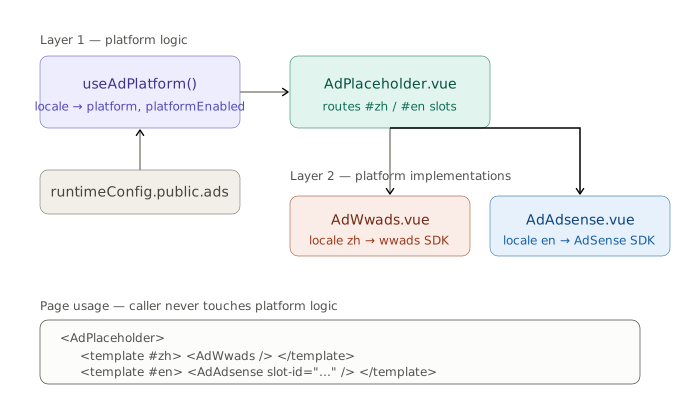
Two layers with strictly separated responsibilities.
Layer 1: platform logic
useAdPlatform is a composable that reads locale from useI18n() and the ads config from useRuntimeConfig(). It computes two things: which platform to use, and whether that platform is currently enabled.
export type AdPlatform = 'wwads' | 'adsense'

export function useAdPlatform() {
  const { locale } = useI18n()
  const config = useRuntimeConfig()
  const ads = config.public.ads

  const platform = computed<AdPlatform>(() =>
    locale.value === 'zh' ? 'wwads' : 'adsense'
  )

  // Master switch AND platform switch must both be true
  const platformEnabled = computed(() => {
    if (!ads.enable) return false
    if (platform.value === 'wwads')   return !!ads.wwadsOpen
    if (platform.value === 'adsense') return !!ads.googleAdSenseId
    return false
  })

  return { platform, platformEnabled }
}
AdPlaceholder.vue consumes the composable and routes to the correct slot. It renders nothing at all when platformEnabled is false — no empty containers, no layout impact.
<template>
  <template v-if="platformEnabled">
    <slot v-if="platform === 'wwads'" name="zh" />
    <slot v-else name="en" />
  </template>
</template>

<script setup lang="ts">
const { platform, platformEnabled } = useAdPlatform()
</script>
Layer 2: platform implementations
AdWwads.vue and AdAdsense.vue each handle their own SDK loading, lifecycle, and rendering. They know nothing about locale routing — that's already been decided by the time they're mounted.
How a page uses this:
<AdPlaceholder>
  <template #zh>
    <AdWwads slot-name="sticky" />
  </template>
  <template #en>
    <AdAdsense type="responsive" adsense-slot-id="4691275817" />
  </template>
</AdPlaceholder>
The page component is completely unaware of platform logic. Switching locales swaps the rendered slot. Turning off ads entirely means flipping ads.enable in runtimeConfig — no page changes needed.
Adding a third platform later means: one new branch in useAdPlatform, one new slot name in AdPlaceholder, one new implementation component. Existing page code stays unchanged.
The AdSense Implementation: Three Problems Worth Documenting
AdAdsense.vue is more involved than a wrapper around <ins>. Here's why.
Problem 1: already-have-ads on SPA navigation
The error message is:
TagError: adsbygoogle.push() error: All ins elements in the DOM
with class=adsbygoogle already have ads in them.
Reproduction path on BulkPicTools: open a tool page → process some images → navigate to the result page → navigate back to the tool page. The second time the tool page mounts, the error fires and the ad slot stays blank.
The cause: Nuxt's SPA navigation doesn't reload the page. window.adsbygoogle persists for the entire browser session. When AdSense's SDK processes an <ins> element, it marks it internally. Vue unmounting the component doesn't clear that mark — it just removes the DOM node. When Vue remounts the component and creates a fresh <ins>, AdSense doesn't see a new element; it sees a recycled DOM subtree and refuses to push again.
The fix is to clear the container in onBeforeUnmount:
onBeforeUnmount(() => {
  intersectionObserver?.disconnect()
  statusObserver?.disconnect()
  if (fallbackTimer) clearTimeout(fallbackTimer)
  // This is the critical line — clears AdSense's internal mark
  if (adRef.value) adRef.value.innerHTML = ''
})
I considered @nuxtjs/google-adsense's approach of randomising data-ad-region on every route change. The problem with that on an SSG site: the random value gets baked into the built HTML, so every build produces different output. Cloudflare's cache invalidation treats changed files as new deploys — the data-ad-region churn would cause unnecessary full-site cache busts. Clearing innerHTML has no build-time side effects.
Problem 2: SDK not ready on mount
The adsbygoogle.js script is loaded globally via useHead / customScripts in the app config. It's async. When a component mounts — especially on a fast navigation or a cold load — window.adsbygoogle may not exist yet.
Calling push() against an undefined window.adsbygoogle silently fails. No error, no ad, no indication of what happened.
The defensive approach is to poll until the SDK is available, with a timeout:
function waitForAdsbygoogle(timeout = 8000): Promise<void> {
  return new Promise((resolve, reject) => {
    if (window.adsbygoogle) return resolve()
    const start = Date.now()
    const timer = setInterval(() => {
      if (window.adsbygoogle) {
        clearInterval(timer)
        resolve()
      } else if (Date.now() - start > timeout) {
        clearInterval(timer)
        reject(new Error('adsbygoogle SDK load timeout'))
      }
    }, 100)
  })
}
8 seconds is conservative. In practice on BulkPicTools the SDK loads in under 500ms on a normal connection. The timeout matters for users on very slow connections — rather than the component hanging indefinitely, it fails gracefully and hides the skeleton.
Problem 3: skeleton screen timing
The first version of the component set isLoaded = true immediately after push() returned. push() is synchronous and returns before AdSense has actually fetched or rendered anything. The result: the skeleton screen disappears, then there's a noticeable blank gap, then the ad appears. On slower connections this gap is several seconds wide.
The right signal is data-ad-status, an attribute AdSense sets on the <ins> element once it has determined the outcome — either filled (an ad was served) or unfilled (no ad available for this slot right now). Watching for that attribute with a MutationObserver gives the precise moment to hide the skeleton:
function watchAdStatus(ins: HTMLElement) {
  statusObserver = new MutationObserver(() => {
    const status = ins.getAttribute('data-ad-status')
    if (status === 'filled' || status === 'unfilled') {
      adStatus.value = status as AdStatus
      isLoaded.value = true
      statusObserver?.disconnect()
      if (fallbackTimer) { clearTimeout(fallbackTimer); fallbackTimer = null }
    }
  })
  statusObserver.observe(ins, { attributes: true, attributeFilter: ['data-ad-status'] })

  // Fallback: if AdSense never sets the attribute, give up after 5s
  fallbackTimer = setTimeout(() => {
    if (!isLoaded.value) isLoaded.value = true
  }, 5000)
}
The 5-second fallback handles edge cases where the attribute never gets set — ad blockers that partially intercept the SDK, certain browser extensions, or network errors that leave push() in a half-executed state.
When adStatus is unfilled, the component keeps a faint "Advertisement" placeholder visible instead of collapsing to zero height. A sudden height collapse causes layout shift for content below the ad — a CLS hit that's worse than showing an empty placeholder.
Complete AdAdsense.vue
<template>
  <div ref="containerRef" class="w-full flex justify-center" :class="customClass">
    <div
      class="relative flex items-center justify-center overflow-hidden rounded-lg border border-dashed
             transition-all duration-300 bg-surface-100 border-surface-200
             dark:bg-surface-900 dark:border-surface-700/50"
      :style="wrapperStyle"
    >
      <Transition name="fade">
        <div
          v-if="!isLoaded"
          class="absolute inset-0 flex flex-col items-center justify-center gap-2 select-none"
        >
          <span class="text-[10px] font-bold uppercase tracking-[0.2em] text-surface-400 dark:text-surface-600">
            Advertisement
          </span>
          <Icon name="lucide:monitor" class="h-5 w-5 text-surface-300 dark:text-surface-700" />
        </div>
      </Transition>
      <Transition name="fade">
        <div
          v-if="isLoaded && adStatus === 'unfilled'"
          class="absolute inset-0 flex flex-col items-center justify-center gap-1 select-none pointer-events-none"
        >
          <span class="text-[10px] font-bold uppercase tracking-[0.2em] text-surface-300 dark:text-surface-700">
            Advertisement
          </span>
        </div>
      </Transition>
      <div ref="adRef" class="relative z-10 w-full h-full" />
    </div>
  </div>
</template>

<script setup lang="ts">
type AdType = 'banner' | 'rectangle' | 'responsive' | 'in-article' | 'in-feed' | 'multiplex'
type AdStatus = 'filled' | 'unfilled' | ''

const props = defineProps<{
  type?: AdType
  width?: string
  height?: string
  customClass?: string
  adsenseSlotId: string
  layoutKey?: string  // required for in-feed only
}>()

withDefaults(defineProps<{ type?: AdType }>(), { type: 'responsive' })

const runtimeConfig = useRuntimeConfig()
const adsenseClientId = computed(() => runtimeConfig.public?.ads?.googleAdSenseId ?? '')

const SIZE_MAP: Record<AdType, { width: string; height: string }> = {
  banner:      { width: '728px', height: '90px' },
  rectangle:   { width: '300px', height: '250px' },
  responsive:  { width: '100%',  height: 'auto' },
  'in-article': { width: '100%', height: 'auto' },
  'in-feed':   { width: '100%',  height: 'auto' },
  multiplex:   { width: '100%',  height: 'auto' },
}

const MIN_HEIGHT: Partial<Record<AdType, string>> = {
  responsive:   '90px',
  'in-article': '250px',
  'in-feed':    '150px',
  multiplex:    '280px',
}

const containerWidth  = computed(() => props.width  ?? SIZE_MAP[props.type ?? 'responsive'].width)
const containerHeight = computed(() => props.height ?? SIZE_MAP[props.type ?? 'responsive'].height)

const wrapperStyle = computed(() => {
  const style: Record<string, string> = { width: containerWidth.value, maxWidth: '100%' }
  if (containerHeight.value === 'auto') {
    style.minHeight = isLoaded.value ? 'auto' : (MIN_HEIGHT[props.type ?? 'responsive'] ?? '90px')
  } else {
    style.height = containerHeight.value
  }
  return style
})

const containerRef = ref<HTMLElement | null>(null)
const adRef        = ref<HTMLElement | null>(null)
const isLoaded     = ref(false)
const adStatus     = ref<AdStatus>('')

let intersectionObserver: IntersectionObserver | null = null
let statusObserver: MutationObserver | null = null
let fallbackTimer: ReturnType<typeof setTimeout> | null = null

function waitForAdsbygoogle(timeout = 8000): Promise<void> {
  return new Promise((resolve, reject) => {
    if ((window as any).adsbygoogle) return resolve()
    const start = Date.now()
    const timer = setInterval(() => {
      if ((window as any).adsbygoogle) { clearInterval(timer); resolve() }
      else if (Date.now() - start > timeout) { clearInterval(timer); reject(new Error('adsbygoogle SDK load timeout')) }
    }, 100)
  })
}

function watchAdStatus(ins: HTMLElement) {
  statusObserver = new MutationObserver(() => {
    const status = ins.getAttribute('data-ad-status') as AdStatus
    if (status === 'filled' || status === 'unfilled') {
      adStatus.value = status
      isLoaded.value = true
      statusObserver?.disconnect(); statusObserver = null
      if (fallbackTimer) { clearTimeout(fallbackTimer); fallbackTimer = null }
    }
  })
  statusObserver.observe(ins, { attributes: true, attributeFilter: ['data-ad-status'] })
  fallbackTimer = setTimeout(() => { if (!isLoaded.value) isLoaded.value = true }, 5000)
}

function buildIns(): HTMLElement {
  const ins = document.createElement('ins')
  ins.className = 'adsbygoogle'
  ins.style.display = 'block'
  ins.dataset.adClient = adsenseClientId.value
  ins.dataset.adSlot   = props.adsenseSlotId

  const t = props.type ?? 'responsive'
  if (t === 'in-article') {
    ins.style.textAlign  = 'center'
    ins.dataset.adFormat = 'fluid'
    ins.dataset.adLayout = 'in-article'
  } else if (t === 'in-feed') {
    ins.dataset.adFormat    = 'fluid'
    ins.dataset.adLayoutKey = props.layoutKey ?? ''
    if (import.meta.dev && !props.layoutKey) console.warn('[AdAdsense] layoutKey is required for in-feed ads')
  } else if (t === 'multiplex') {
    ins.dataset.adFormat = 'autorelaxed'
  } else if (t === 'responsive') {
    ins.style.width = '100%'
    ins.dataset.adFormat            = 'auto'
    ins.dataset.fullWidthResponsive = 'true'
  } else {
    ins.style.width  = containerWidth.value
    ins.style.height = containerHeight.value
  }
  return ins
}

async function loadAd() {
  if (!adsenseClientId.value || !props.adsenseSlotId) {
    if (import.meta.dev) console.warn('[AdAdsense] missing clientId or slotId')
    return
  }
  if (!adRef.value) return

  try {
    await waitForAdsbygoogle()
  } catch (e) {
    if (import.meta.dev) console.error('[AdAdsense]', (e as Error).message)
    isLoaded.value = true
    return
  }

  adRef.value.innerHTML = ''
  adStatus.value = ''

  const ins = buildIns()
  adRef.value.appendChild(ins)
  watchAdStatus(ins)

  try {
    ;((window as any).adsbygoogle = (window as any).adsbygoogle || []).push({})
  } catch (e) {
    if (import.meta.dev) console.error('[AdAdsense] push failed:', e)
    isLoaded.value = true
  }
}

function initObserver() {
  if (!('IntersectionObserver' in window)) { loadAd(); return }
  intersectionObserver = new IntersectionObserver(
    entries => {
      if (entries[0]?.isIntersecting) {
        loadAd()
        intersectionObserver?.disconnect(); intersectionObserver = null
      }
    },
    { rootMargin: '200px 0px' }
  )
  if (containerRef.value) intersectionObserver.observe(containerRef.value)
}

onMounted(() => { if (import.meta.client) initObserver() })

onBeforeUnmount(() => {
  intersectionObserver?.disconnect(); intersectionObserver = null
  statusObserver?.disconnect(); statusObserver = null
  if (fallbackTimer) { clearTimeout(fallbackTimer); fallbackTimer = null }
  if (adRef.value) adRef.value.innerHTML = ''
})
</script>

<style scoped>
.fade-enter-active, .fade-leave-active { transition: opacity 0.3s ease; }
.fade-enter-from, .fade-leave-to { opacity: 0; }
</style>
My Take
Why locale code instead of IP detection
An SSG site has no server. There's no request context where you could read a header like CF-IPCountry. The locale is already available client-side via useI18n() the moment the component hydrates — no extra network request, no edge function dependency.
The trade-off: a user who has selected the Chinese locale but is physically outside China will see wwads instead of AdSense. In practice that's a small population and an acceptable misclassification. Introducing a server dependency — even a Cloudflare Worker — to get IP-based routing would add latency, complexity, and a new failure mode, none of which are worth it for this edge case.
Why clean innerHTML instead of data-ad-region randomisation
The @nuxtjs/google-adsense module handles the SPA navigation problem by generating a random data-ad-region value each time an ad is requested, which causes AdSense to treat it as a new slot. That works for SSR sites, but on an SSG site the random value is generated at build time and baked into the HTML. Two builds produce two different files, which invalidates Cloudflare's cache for files that haven't meaningfully changed. Clearing innerHTML in onBeforeUnmount solves the same problem with no build-time side effects.
The real limitation of this architecture
Every new ad platform requires a new component. That component has to handle its own SDK loading, lifecycle cleanup, and error states — there's no shared base class. The AdWwads.vue implementation is structurally similar to AdAdsense.vue but can't share code with it because each SDK has its own idioms (wwads uses a script tag with a site ID attribute; AdSense uses push() on a global array). The abstraction boundary is at the slot level, not at the implementation level.
That's a real cost. Before adding a third platform, it's worth evaluating whether you actually need the platform to be swappable, or whether a simpler direct integration would be less maintenance.
Debugging in production only
AdSense and wwads both refuse to serve real ads on localhost. The component behaves correctly — the waitForAdsbygoogle polling resolves, push() fires, data-ad-status eventually gets set — but you get unfilled every time. There's no way to test the filled code path without deploying to your actual domain. This makes iteration slow: change component logic → commit → push → wait for Cloudflare Pages build → verify in production. For anything involving ad rendering state, plan for 15–20 minutes per feedback loop.
Result
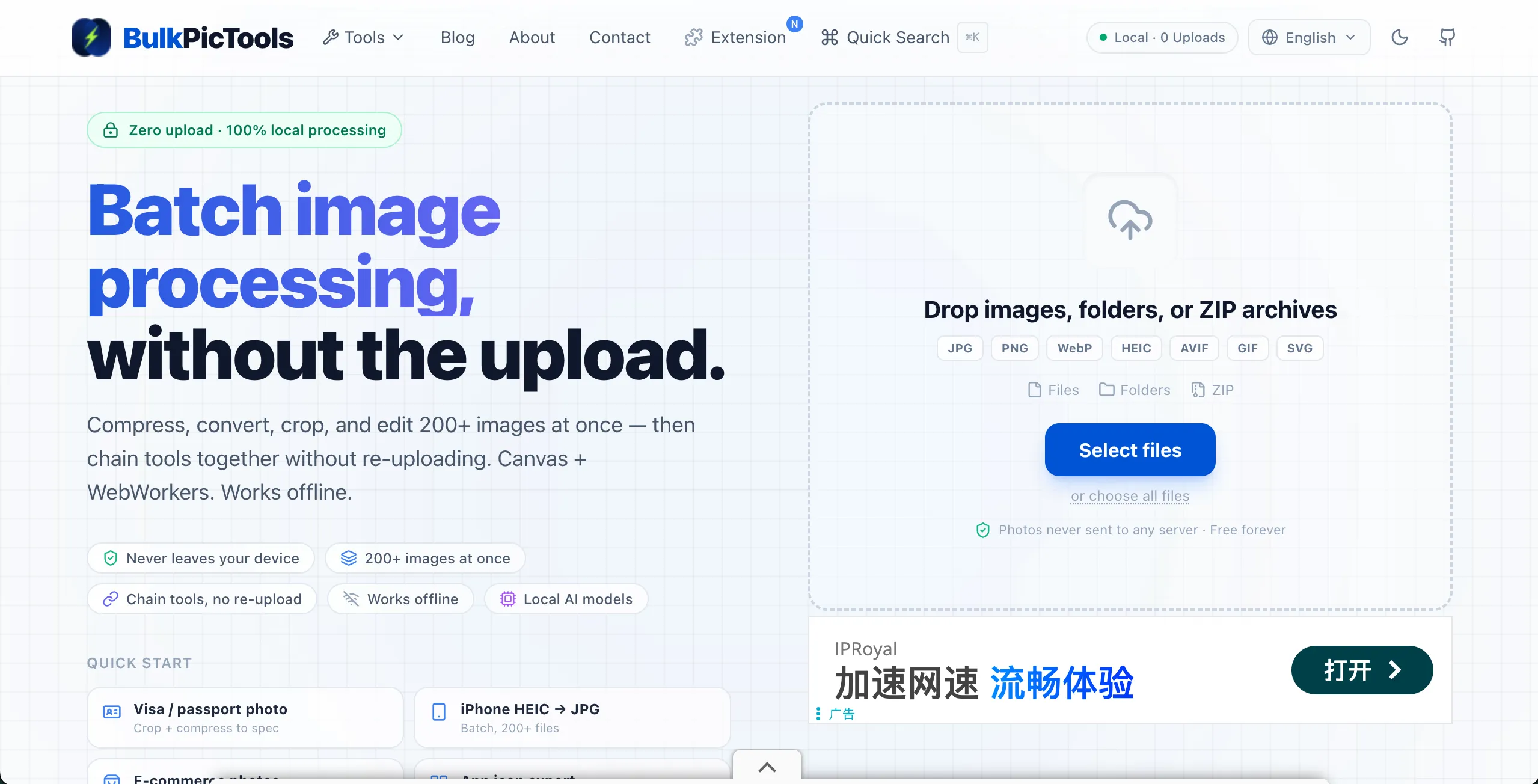
Both platforms running in production, routing correctly by locale. Chinese locale (left) shows a wwads unit. English locale (right) shows an AdSense unit at the same page position.

Lessons Learned
1. Separate platform routing from platform rendering at the component boundary, not inside a single component. A single component with an if (platform === 'adsense') branch eventually becomes unmanageable. Two lean implementation components behind a routing shell stays readable and independently testable.
2. push() succeeding is not the same as an ad rendering. Use MutationObserver on data-ad-status to know when AdSense has actually committed to filling or not filling the slot. Anything that depends on ad presence — hiding skeletons, adjusting layout — should wait for that signal, not for the SDK call.
3. The already-have-ads error is a lifecycle mismatch, not an AdSense bug. Vue's component lifecycle and AdSense's internal DOM marking don't know about each other. onBeforeUnmount is the right place to bridge that gap. One line of innerHTML = '' is enough.
4. On SSG sites, plan for production-only ad debugging from the start. Build a skeleton/unfilled UI you're confident in locally, then accept that any state involving real ad fill requires a production deployment to verify. Trying to approximate this locally with mock data is possible but rarely worth the effort — the SDK's own behaviour is what you need to test against.