TL;DR
I had 68,200 image search impressions across my tool site bulkpictools.com and only 8 clicks. Average ranking: 47.9. I didn't even know this data existed until recently — because I'd never opened the Image tab in Google Search Console. The root cause wasn't bad content. It was that I had never told Google what my images actually were. This post is about what I found, why it happened, and what I changed.
Background: An Accident on a Different Site
I run two sites. BulkPicTools is a bulk image processing tool — compress, convert, crop, all locally in the browser. aifindr.org is newer, a directory of useful AI tools.
While setting up a tool page on aifindr.org, I added a video:video node to the sitemap entry. The video content itself wasn't ready — the node was basically empty. I added it mostly as a placeholder, planning to fill it in later.
A few days later, I opened Google Search Console and noticed something: that page had appeared in the Video indexing report. Status: "Video discovered — currently not indexed."
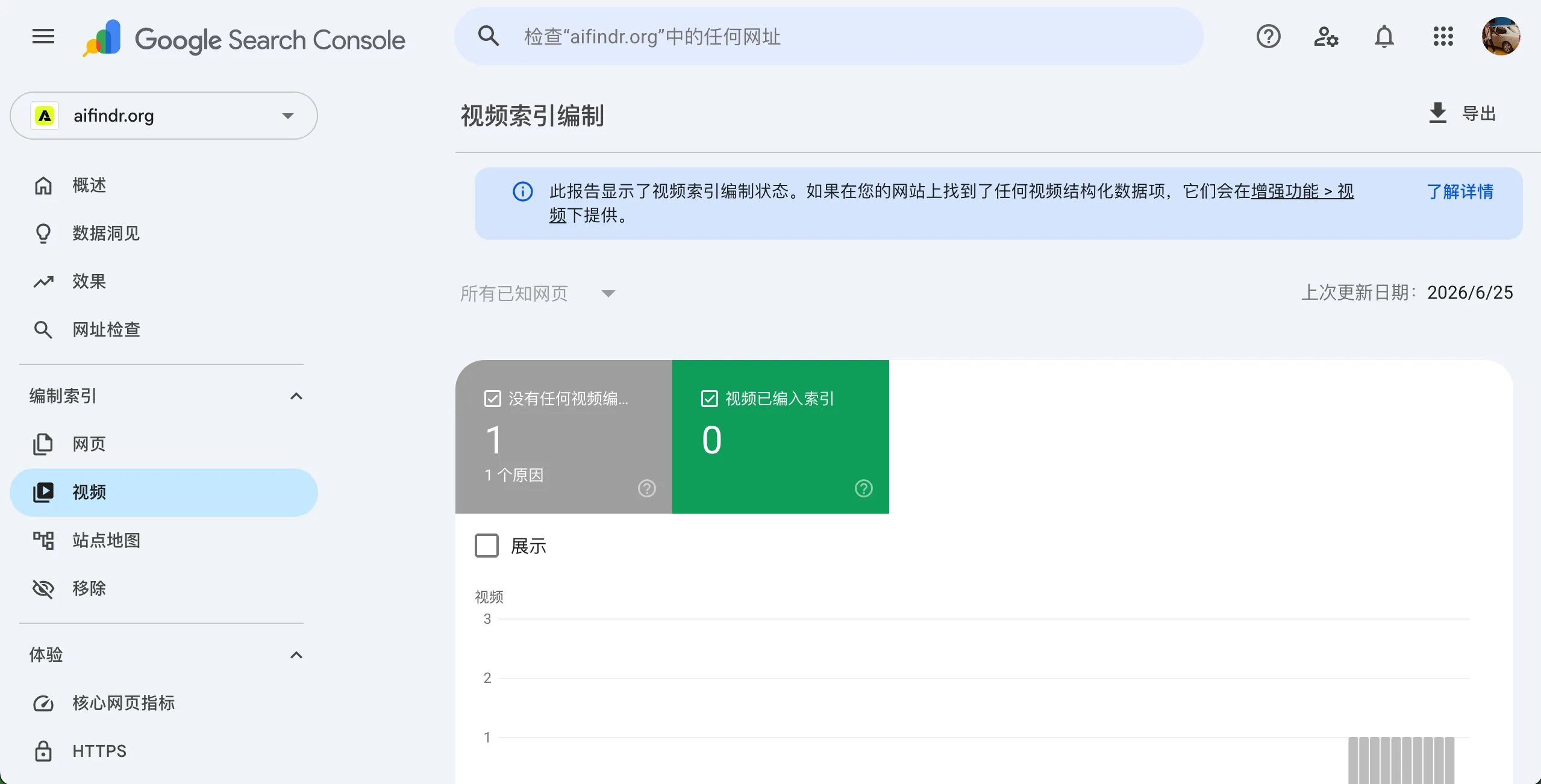
An empty node was enough for Google to notice the page had video content. I hadn't submitted anything — just declared the intent in the sitemap. Google responded within days.
That small accident made me think: if Google picks up a video signal that fast, what's happening with images? I went back to BulkPicTools and opened a tab I had honestly never looked at before.
The Problem: 68,000 Impressions I Was Basically Wasting
In Google Search Console, under Performance, there's a dropdown to switch Search Type from "Web" to "Image." I had never switched it.
When I did, this is what I saw:
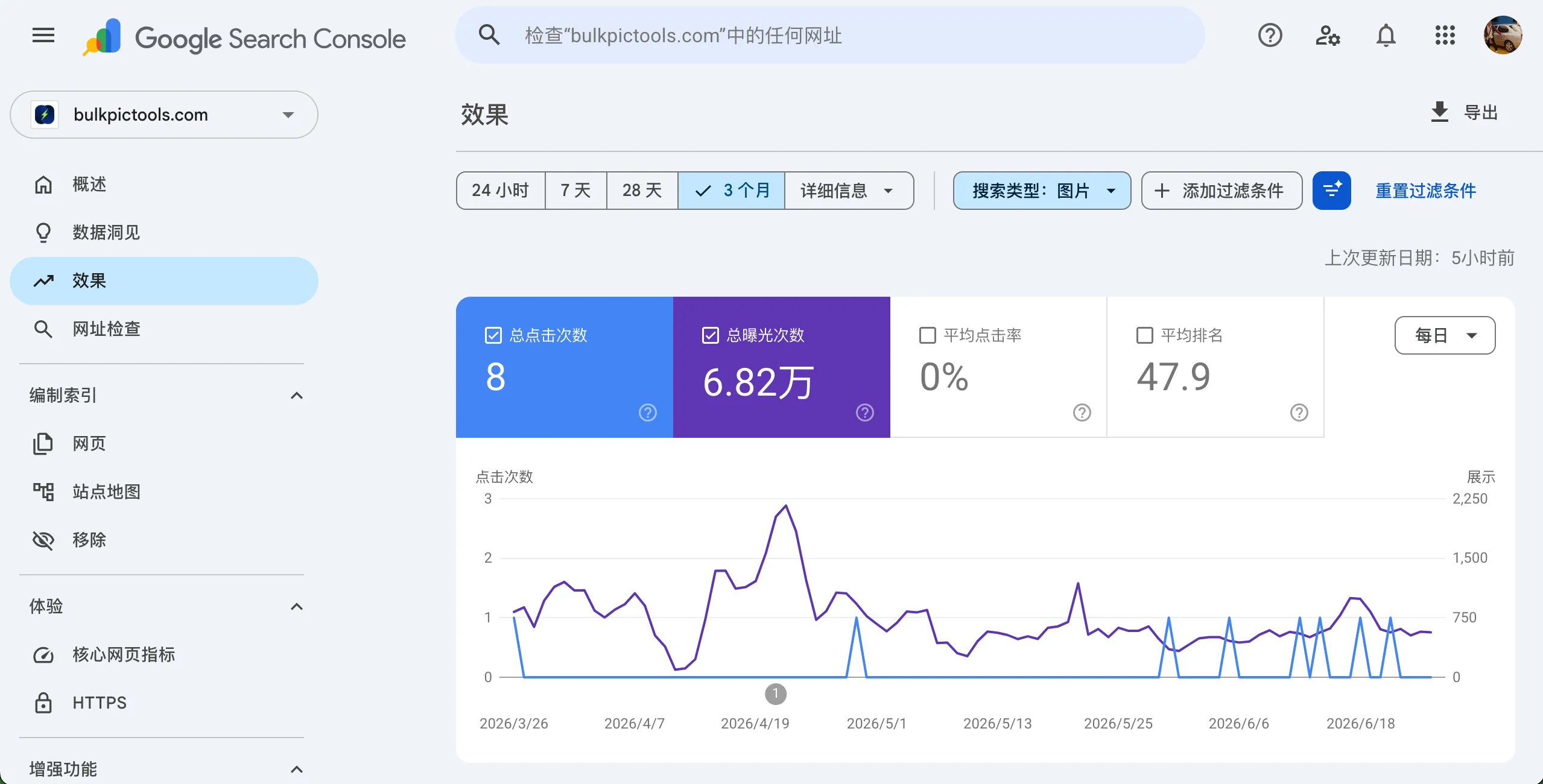
| Metric | Value |
|---|---|
| Impressions | 68,200 |
| Clicks | 8 |
| CTR | 0.012% |
| Average Position | 47.9 |
Sixty-eight thousand times, Google showed one of my images somewhere in its image search results. Eight people clicked. That's not a traffic problem — that's a signal problem. Google had already decided my images were relevant enough to show. It just didn't rank them high enough for anyone to actually see them.
Average position 47.9 means my images were sitting on page 5 or beyond. In image search, that's effectively invisible.
The question was: why?
Investigation: How Google Actually Understands an Image
Before I could fix anything, I needed to understand what signals Google uses to rank images. It's not the same as web search, and I had been treating them the same way — which is to say, not thinking about it at all.
Here's what I pieced together:
The signals Google uses to understand an image, roughly in order of impact:
- Surrounding text context — The paragraphs immediately around the image. This is often the strongest signal and the most ignored one. An image placed next to a paragraph about "bulk JPEG compression" is understood very differently than the same image placed in an unrelated section.
- Page title and H1 — Gives the image a topic to belong to.
- Image
altattribute — An explicit, author-provided label. Google says this is the single most important on-page signal for images. It's not just for accessibility. - Image filename —
compress-jpg-result.webpgives Google something to work with.IMG_4521.jpggives it nothing. image:titlein the Sitemap — A declaration at the sitemap level, separate from the page HTML. Most developers don't know this exists.- Visual content recognition — Google's own computer vision can interpret what's in the image, but it still weights the textual signals heavily.
The key insight: these aren't alternatives. Each signal reinforces the others. Missing even two or three of them leaves Google with a weak, uncertain understanding of what your image is about — so it ranks it conservatively.
For BulkPicTools: my tool pages had almost no images to begin with (tools are mostly UI, not image-heavy). The few images I did have were screenshots with generic filenames and no alt text on the tool pages. I had only written proper alt text on blog posts. The sitemap had zero image nodes.
I was providing almost no signal across any of these dimensions. The 47.9 average ranking was accurate.
The Diagnosis: What "High Impressions, Low Ranking" Actually Means
This combination — lots of impressions, position in the 40s — is actually a specific and identifiable state. It's worth understanding because it tells you exactly what's wrong and what to do about it.
What high impressions means: Google has already decided your images are topically related to certain search queries. You're in the game.
What position 47 means: Your relevance signal strength isn't competitive. Other sites have clearer, stronger signals for the same queries, so they rank above you.
Compare this to two worse situations:
- Low impressions + low position: Google hasn't connected your images to any meaningful queries. The issue is discoverability, not signal strength.
- Low impressions + high position: You're ranking well for very low-volume queries. Not a problem, but not much opportunity either.
High impressions + low position is the most actionable state. The audience is there. The queries are real. You just need to strengthen the signal.
One caveat: a position-1 result with 0 clicks doesn't automatically mean something is broken. Google runs experiments — sometimes an image appears in a narrow test, collects no user data, and disappears. I had a handful of those in my Bing keyword data too. Don't over-interpret individual data points. Look at the pattern across many queries.
Solution: Four Dimensions, Applied in Order
I didn't try to fix everything at once. I focused on the highest-impact changes first.
1. Add image:image Nodes to the Sitemap
This was the most obvious gap. My sitemap had <loc> and <lastmod> for each page and nothing else. I added image nodes for each tool page's hero image.
The Nuxt Sitemap module (@nuxtjs/sitemap) supports this natively. Here's the structure I ended up with for each tool page entry:
{
  "loc": "/tools/compress/image-compressor",
  "lastmod": "2026-06-26T06:29:11.589Z",
  "images": [
    {
      "loc": "https://bulkpictools.com/og/image-compressor/en.png",
      "title": "Free bulk image compressor — compress JPG PNG WebP locally, no upload needed"
    }
  ]
}
The title field is the critical part. It's a natural language sentence, not a keyword list. It covers the functional description ("bulk image compressor"), the supported formats ("JPG PNG WebP"), and the key differentiator ("locally, no upload needed") — which also happen to be long-tail search terms.
Why not use the primary keyword "image compressor"? Because that's already dominated by TinyPNG, iLoveIMG, Squoosh, and similar tools with years of domain authority. A new site cannot compete on that term directly in image search any more than in web search. Long-tail descriptive phrases — the kind of thing someone types when they've already tried the obvious tools and want something specific — are where a smaller site can actually appear in the top 20.
The long-tail terms I used came from GSC and Bing Webmaster Tools keyword data. I exported the reports and had Claude analyze them to surface the queries where I already had impressions but low ranking. Those are the queries where Google is already associating my site with the intent — I just needed to reinforce the signal. (I'll write a separate post on that keyword analysis workflow.)
2. Add video:video Nodes
After the aifindr.org discovery, I added video nodes to the tool pages where I plan to add demo videos. The video content isn't live yet, but the node structure is ready:
{
  "videos": [
    {
      "title": "How to batch compress images using BulkPicTools",
      "description": "Compress unlimited JPG, PNG, and WebP images at once. Reduce file size by 80–90% or to specific targets (200KB, 1MB) locally without losing quality.",
      "thumbnail_loc": "https://bulkpictools.com/og/image-compressor/en-video-thumb.png",
      "content_loc": "https://bulkpictools.com/videos/image-compressor/en.mp4"
    }
  ]
}
Two things I learned the hard way about the video node:
thumbnail_loc cannot reuse the OG Image. Google's video indexing requires a thumbnail that actually represents the video content. Using your page's OG Image as the video thumbnail risks the submission being rejected — Google may determine the thumbnail isn't related to the video. Create a separate thumbnail that's a still from the actual video.
content_loc vs player_loc: If your video is self-hosted and directly accessible via HTTP, use content_loc. If it's on YouTube or Vimeo, use player_loc with the embed URL instead. If you later move a self-hosted video to YouTube, you need to update the node — these aren't interchangeable.
3. Separate OG Image from Sitemap Image
This is the one that surprised me most. I had been using the same image for both — the OG Image (social sharing) and the sitemap image submission. They're not the same thing and shouldn't be treated the same way.
| OG Image | Sitemap Image | |
|---|---|---|
| Primary audience | Social media platforms | Google Image Search |
| Standard ratio | 1200×630 (16:9) | Closer to square (4:3 or 1:1) |
| Optimization goal | Visual appeal, brand recognition, social CTR | Search intent match, ranking signal clarity |
| Content priority | Brand feel, product overview | Functional description, specific use case |
The ratio issue is practical: Google image search displays thumbnails in a near-square crop. A 1200×630 wide image gets cropped on the sides, potentially cutting off the most important visual information. A square or 4:3 image fills the thumbnail properly.
I now maintain a separate hero image designed specifically for sitemap submission — same content, different composition centered for square display.
4. Fix Alt Text on Tool Pages
My blog posts had carefully written alt text. My tool pages had almost none. This is backwards — tool pages are the pages I actually care about ranking.
The fix is simple in principle: every image on a tool page gets a descriptive alt that explains what the image shows in the context of the page.
For a screenshot of the compression result interface:
<!-- Before -->
<img src="result.png" alt="" />

<!-- After -->
<img src="compress-jpg-result-before-after.png"
     alt="Bulk image compressor result showing original 4.2MB JPG compressed to 380KB locally in browser" />
The alt doesn't need to be long. It needs to be specific to what's actually in the image.
My Take
Three things I'm still thinking about:
"Already discovered" is not "indexed." The aifindr.org video node showing up as "discovered" felt like a win, but discovered and indexed are different states. Google found it; it hasn't committed to showing it in results yet. I was initially excited by how fast Google responded. But I'm being careful not to treat a crawl confirmation as a ranking improvement.
The 68,000 impressions were hiding in plain sight. The Image tab in GSC is easy to miss — it's a dropdown, not a separate menu. I looked at my Search Console regularly and never noticed I was sitting on nearly 70,000 image impressions going nowhere. If you haven't checked your own Image performance tab recently, that's the first thing I'd do after reading this.
This is free traffic that most indie developers aren't competing for. The sites that dominate image search for generic terms like "image compressor" are large, well-funded products. But specific tool functionality, specific formats, specific use cases — those long-tail image queries are less contested. A tool site with clear, specific alt text and proper sitemap declarations has a real shot at appearing in the top 20 for the queries that matter to its actual users.
Result
As of publishing, the image:image nodes are live in the sitemap. The video node structure is in place, waiting for video content. I've also updated alt text across the main tool pages.
The GSC data won't reflect these changes immediately — Google needs to recrawl the sitemap and reprocess the images. I'll check back in 4–6 weeks and update this post with what changed.
Update pending — will revisit once GSC image performance data reflects the new sitemap submissions.
Lessons Learned
- Open the Image tab in Google Search Console. It's under Performance → Search Type: Image. Most developers have never looked at it. If you have any images on your site, the data is probably there.
- High impressions + low position = signal problem, not content problem. Google already knows your images are relevant. You just haven't given it enough evidence to rank them higher. The fix is adding signal, not replacing images.
image:titlein your sitemap is a separate signal fromalt. One lives in HTML, one lives in the sitemap. They work together. Most image SEO guides only mention alt text and miss the sitemap dimension entirely.- OG Image and Sitemap Image should be designed separately. Different aspect ratios, different optimization goals. Reusing one for the other is a compromise on both.
- An accidental discovery on a side project can reframe how you think about your main one. The aifindr.org video node was a throwaway placeholder. It turned out to be the thing that made me look at BulkPicTools' image data for the first time. Keep running experiments on smaller projects — the learnings transfer.
Frequently Asked Questions
Does adding images to a sitemap guarantee they'll rank in Google Image Search?
No. The sitemap tells Google where your images are and gives it metadata to evaluate them. Whether they rank — and how high — depends on the relevance signals across alt text, surrounding content, filename, and the image itself. The sitemap is one input, not a guarantee.
What's the difference between image:title in a sitemap and the alt attribute in HTML?
They're separate signals that Google reads independently. The alt attribute lives in your page HTML and describes the image in its page context. The image:title in your sitemap is a declaration at the crawl level — it helps Google understand the image before it even processes the page. You need both.
Should I submit a separate image sitemap or add image nodes to my existing sitemap?
Either works. If you already have a sitemap, adding image:image nodes inside your existing <url> entries is simpler and keeps everything in one file. A separate image sitemap only makes sense if you have a very large image library (thousands of images) and want to manage it independently.
What happened when you added an empty video node to your sitemap?
Google picked it up within a few days and showed it as "Video discovered — currently not indexed" in the Video Indexing report. It didn't index the video (there was no video), but it confirmed Google responds quickly to sitemap declarations. When the actual video goes live, the node is already in place.
How do you choose what to write in image:title?
I start from my existing GSC and Bing keyword data — specifically queries where I already have impressions but rank in the 20–50 range. Those are queries where Google has already associated my content with the intent. I write a natural language sentence that includes 2–3 of those long-tail phrases without making it read like a keyword list. The goal is something a human would write to describe the image, that also happens to match what searchers are actually typing.